Google Documents and cloud computing

Warning geek stuff, skip this if email and web apps are not your thing 🙂

The big trend these days is cloud computing, a buzzword talked about a lot by IT managers and vendors of IT services alike.  Looking after servers isnt a nice task, as the average IT administrator worries about possible threats (electricity fails, overheating, unauthorised persons get into the room, hackers, making sure backups are done, hardware failure, fires or floods) that could take those servers offline.

Cloud computing, is just a term for putting all your data on a server managed elsewhere, by a dedicated hosting company, they keep all the servers in a nice safe purposed designed building that should be looked after by specialists, has power protection and back ups of all the data in case of a physical hardware failure causing files to be lost.  It makes more sense to do it this way and takes a huge burden off the IT team.

Google is the biggest supplier of cloud services in the world, as well as a lot of their services are free.   Instead of buying the server hardware, pay for the server operating system (ie: Windows Server 2008) and mail management system (Exchange 2010)  the organisation I work for just have Google do all of the work of hosting the mail for us.

I started using a normal version of Gmail for my own personal use about 7 years ago and have not looked back.   Now Google do a business version of this which is more or less the same, you get to assign a domain name fred@fredstropicalfish.com and the IT person in the company has a admin console which they can add, change, suspend or delete accounts, just a few minutes work to add a new member of staff.

For the free package you have 500 mail accounts and 7Gb of email per person.  The most one of our staff has used in 55%.  Support is not included, get an issue and you are on your own searching to find out what is wrong, alternatively the paid accounts have 24 hour telephone support.   Obviously Google use their hugely successful adverts to get revenue from the free accounts.

Last week I moved over four of our users off an old POP3 (term for mail account provided from a specific mail account, (in UK: Orange/Wannado/Freeserve, Talktalk, Tiscali, AOL, Virgin, BTconnect, in Israel: Walla, Netvision, Bezeq etc)  to one hosted by Gmail.   This has a great many benefits, the mail is stored on Google’s servers and not onto your own computers, so a hard disk fails on your computer, you will not lose everything.  I could copy everything of the POP3 mail account to Gmail using some free dedicated tools that did all the hard work provided by Google.  Calenders and address books are all copied over too.   Now the staff can work anywhere (if they are ill or on holiday they can work from home)  or on a mobile device.

But as well as a huge and free mail systems, Google are heading for a showdown with Microsoft to not only steal people away from Outlook for email, but from Word and Excel as well.

I rarely use Word and Excel now, and like the idea of writing documents, drafts for my blog, to do lists, documentation for work with Google Documents and get at it from any computer anywhere on the internet.
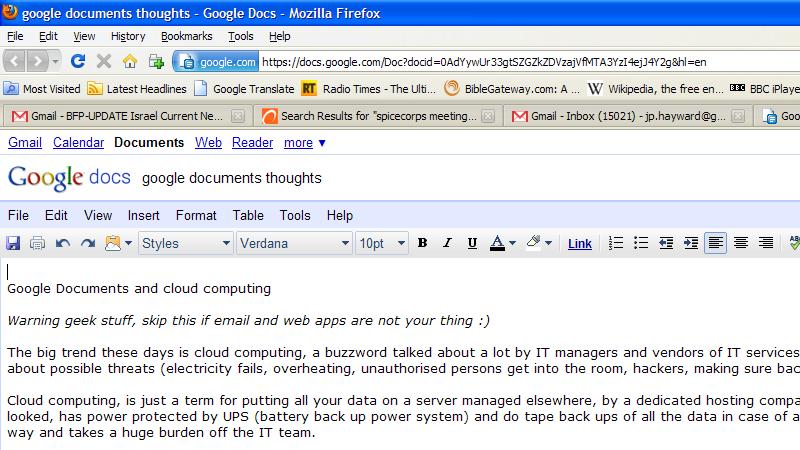
Its still needs a bit of time to mature I think as a substitute for Microsoft’s Word and Excel, but Google Apps is indeed a jolly good package of web based apps you can use anywhere.

Being able to collaborate on a single document amongst a team of people, gives you some big advantages if say, a technical manual, Bob can edit the first few pages and Gary and put in an index at the end.  This can speed up working on large more complex documents, rather than have email attachments to and fro and worry about who has the most recent copy of a document, when instead its stored in one central place and everyone can get at it.

Possible limitations and issues.

Gmail does not support sending or receiving read receipts.  Outlook has a feature when sending a mail which is important to force the user to send an acknowledgment they got it.

Clicking on an email link on a web site does not have a way of opening a new tab in your browser to send a mail to that link.  Instead you are likely to get crummy old Outlook Express or Outlook (even if not configured to persuade you send mail that way.   I think this could be fixable with an extension for Firefox or Chrome.

The British spell checker extension for Firefox only intermittently works.  (Although seems to want to force me to use American spelling!)

The word processor app has the text cursor disappear sometimes, not sure why.  Means I can still type ok.

Google Spreadsheets doesn’t allow text put in cells (especially when writing titles at the top of a sheet) to flow over to the next cell like Excel does.  There is got to be a simple way around this I am sure, I just need to read up on this some point.

Software update roll outs

In the world of traditional locally installed software, no IT administrator worth his salt rolls out an update for a software package in a live commercial environment without testing if first.  Small discrete changes in a new app can break functionality in a business’s own set up, and can be hugely difficult to track down.

Therefore with software offered as a service, a current version and new version should be running in tandem in order for people to test and make sure it all works correctly as well as letting users familiarising themselves with it.  Users get upset if things get changed around unexpectedly.

So when improvements are announced, I am hoping Google can let us try the new versions a little at a time to make sure there are no compatibility problems.

We had some headaches with our users trying to add attachments to emails once, this issue was the same on PCs and Macs, IE, Firefox or Chrome.   Searched the web for a solution.  Nothing.  Possibly bug that Google hasn’t owned up to, or issue with Israel hosted Gmail accounts maybe.

Security and accountability

When I left Israel before, my administrator rights over my Google Apps got revoked suddenly.  The rest of my team did not disable my account.

It turns out this is a security feature as (it would seem) when I was trying to access my account back on a UK IP address (instead of a Israel IP) flagged this as suspicious activity.   I guess this is a good idea, but it would of been nice for my colleagues to get some warning of this to work out why.

One of email accounts on our systems disappeared suddenly.  I had been deleting some redundant accounts the week before.  I thought I had double checked everything very carefully, but it might of been my fault.

Therefore, a status windows of recent activity I think is really in order.   I am going to imagine that a fictional company called Freds Tropical Fish has three IT administrators called Bob, Gary and Sheila.  This week Sheila is newly hired so her colleagues create her on the system.

1.45 17/6/10 Bob has created user – salesenquiries@fredstopicalfish.com
4.24 16/6/10 Sheila has deleted – oldinvoices@fredstopicalfish.com               [undo]
9.28 14/6/10 Gary has given user – sheila@fredstopicalfish.com   – admin rights
9.14 14/6/10 Gary has created user – sheila@fredstopicalfish.com

Really just a box with recent activity is needed, then I know if its my fault I deserve to getting a kicking for deleting something by accident 🙂

Google being the largest player of Cloud services in the world ought to have another impartial organisation just arbitrate over privacy and security, following a scare over Google’s camera cars that took the streemap pictures were also listening in on people’s wireless networks, Google said they apologised and they weren’t supposed to be recording this particular information.

With its world leading infastructure and rumours that the NHS could store patient records there, this could be physically possible, but some kind of trusted third party authority to make sure data is held securely there would give people peace of mind.

Co-location.

I would like to see some actual site Google can show how their system fails-over in the event of a outage at one it data centres.  I am assuming there is plenty of co-location (ie: my files are hosted in two different physical locations)  in case of something severe, lets say a fire broke out affecting a server.

Hey Google, you could even use Google Maps with pins to show where your data centres with pins showing, with live stats of any possible issues and what the procedure is for fail-over if one of those has an outage.

This is particularly worth thinking about in Israel where there is always the threat of war.

3G mobile support

If a user is on a laptop out in the field away from a regular network connection, they maybe on a 3G cellular modem.  These things can be expensive offering pay per megabyte metered usage.  Here network connection should be done in such a way to only use a small measured amount of bandwidth as and when necessary and caching the work locally on the PC’s hard disk.

I have a friend who does support in South Africa where domestic broadband availability is a rarity and expensive, this would be useful for him.

Cyberattacks.

Google admitted there was a security vulnerability. If they are honest about it and takes steps to fix it swiftly then this is fine, all software has security holes which need to have updates put on regularly.


Training and online help

This is probably the most tricky aspect of the whole thing is getting users familiar with using it.

Here is some ideas.

Microsoft put a nice thoughtful bit of assistance for their users moving up from a rival product.

Look at Microsoft’s Word and you can see help for those used to using Word Perfect which was a popular word processor in the 1990s.

With the older versions of Excel, (sorry don’t have a picture) you can see what to learn for users that were on Lotus 123.

Mozilla does this with Firefox too. 🙂

So, Google could offer some help that shows a list of shortcuts of what user may need to get used to when changing from Microsoft Office.

Overall I am very happy with the way Google documents/apps works, ease of merging in old mail accounts from another provider and look forward to when new features and improvements are released, there is growing better integration with things like maps and language translation as well which are enormously useful too.  I like the fact if your wireless drops on your laptop, its not an issue as a document is saved every one minute or so, so it should be safe in the event of loss of network connection, or the PC crashes or loses power.

Bridgend Wales visit

Our UK office had some IT gremlins that was making things a bit hard for them, so I volunteered to go out and get a train all the way to Bridgend in South Wales and stay with one of the managers there.

Going long distances on a train is very pleasant way of traveling.  Gone are the days of ancient slam door trains which had some charm, even if you had to stick your hand out of the window to open the outside handle to get out.  (I used to commute from Fratton to Fareham back 10 years ago) Modern fast trains means getting around the country doesn’t make the UK look like an embarrassment compared to the transport systems of the rest of Europe.   Going by rail means you get to see all kinds of things you don’t see in a car or bus, peoples gardens, derelict factories, nature, mostly deer, rabbits and foxes that aren’t afraid of being close to the line, also a glimpse of the city of Cardiff with its mix of old and new architecture together blended well.

This was great as I managed to get almost everything done there (apart replace one antivirus app which I did later using remote software)  The new email system was put in, and the old email addresses were merged into the new system.  Google Apps, which includes the business version of the popular web based mail client Gmail is quite a pleasure to set up and use, some aspects are a little quirky maybe to get used to if you are used to a traditional Microsoft Outlook client for email, but better when you get more used to it.  I will blog more on specific aspects of this another time though.  The migration project was a complete success even though this was a new type of project I have not done before, plus it didn’t cost anything to our organisation either, I have had one support question to answer for this team so far which is better than I expected.   The staff will not use Google’s word processor or spreadsheet app at this time, as they will stick to Word and Excel like the rest of the organisation for the time being.

I needed to go out and buy a new hard disk to replace one that was too small on one staff member’s PC, this was done just as the office closed and I fitted it and cloned everything across the next day.  The rest of the time I replaced Internet Explorer with Firefox, Nero with Infrarecorder for CD burning, Windows Media Player/Quicktime with VLC player for playing all kinds of audio and video content.  All these apps are just more simpler and efficient without the drag of unexpected (annoying search toolbars etc) bits included, open source can work extremely well in business, seeing as applications can be written more in mind of people who used them.

The evenings I spent in Wales were also good, I got taken out for dinner at a very old pub (at least 300+ years?) in a nearby village, this pub had a large collection of Toby Jugs hanging from the ceiling, and looking outside on to the garden there is an aviary with budgies in but also some chipmunks, which I noticed one of these furry fast movers had got out and was running around the patio.  After a nice cod and chips and pint of Brains (beer from Cardiff)  I did a brief bit of remoting into the office from my laptop to check on the 2800 emails to migrated over to the new system from one user which took a few hours to do.  The next day we went out for a curry as well, so I was extremely well fed on this three day trip.   The pictures didn’t come out right on the phone, but the beach outside had views over the sea onto Devon!

June Gaza Flotilla incident and being a volunteer in a unpopular place

I know Christians working in numerous troubled parts of the world all over.  Pakistan, South Africa, Chile, Ukraine and many more.  Western nations as well.   For me, being in Israel has to be one of the most difficult, not so much just in the context of my actual role and living there, but more in case of being an ambassador and explaining to people in my home country both Christians and non-Christians alike why I am volunteering there.

“Christians supporting Israel? Oh so you are Zionist are you?”  is sometimes reactions I get.   This week has been particularly difficult as I try and explain to some people what I believe why the IDF had to board the ships by ‘freedom fighters’ trying to enter Gaza.

In a usual predictable fashion, there is worldwide condemnation of Israel being an aggressor on civilians yet again.   But hold on are these people really people providing humanitarian aid and support to the Palestinians?  Look on Youtube and you can see videos released by the IDF about these people came armed, ok mostly with relatively crude weapons, kitchen knives, iron bars and such, but still able to kill.   Fine if you wish to make a legitimate statement they could of just held up banners and could arrange a third party from the UN to arbitrate sending goods and assistance from their boat to the people in Gaza, instead they were there motives are not so well intentioned.  Even more so, one of the pro-Palestinian activists (I think from the UK or Europe) brought an 18 month old child, why?  Sounds familiar like Hamas terrorists deliberately attack Israel from amongst buildings knowingly containing women and children.  To the folks from Europe, just like some anarchic animal rights protest group, it probably seems jolly exciting to join a band of mercenaries against what they have read as an oppressive authority, and join a cause.  Its now been found that the supposed Turkish freedom fighters have links to Al Queda.

As I said earlier, I am not really a political sort of person.  In the UK I have voted on all three parties at different years, sometimes though when injustice and lies come from our familiar media channels you need to speak out, and when you are a Christian supporting Israel, your views are not always very popular.  All boycotts are a stupid and pointless thing and don’t achieve anything productive.  Instead we need pray and show love to people in all places of conflict.   Israel may get financial support from the US, but for me as a volunteer, the kind donations I have been given by people this year can be counted on one hand.   I am in great need of sponsorship and through asking through various channels, finding a regular sponsor has turned up very little so far.

My role as an IT administrator in the charity in Jerusalem means I have a relatively hidden backroom job but very necessary role of keeping a charity infrastructure running.  As usual with my blog I don’t like talking about politics and arguing, so I will get back to just more biblical places I have visited and seeing people in need lifted up and encouraged by the different Christian organisations I know of here.

currency conversion and Google Documents

Often whilst I am here in Jerusalem, I need to convert money from one type to another.  Items sold for large figures like property here in Israel often get listed in US Dollars.  If you haggle over something in an Arab market, if he knows you are foreign he will give you a price for a more expensive item in Dollars also.   I have bought parts to fix volunteers laptops every now and then and so I often need to give them prices in UK Pounds, Shekels, Dollars, Euros or South African Rand, depending where I source a part for and what currency they are most familiar in.

I often use a popular site called www.xe.net to convert things, when using Shekels you have to scroll all the way to the bottom and select “more currencies..”  this means this can be a bit slow and fiddly for working out conversions for small countries like Israel with their own indigenous monetary system.

In the last year or so I have started using Google Documents more and more, doing some work with traditional tools like Microsoft’s venerable Word and Excel is fine, (apart from a revamped and unfamiliar icon system on Office 2007 which befuddles a lot of users)  but rather than make a file and email it or have to copy it onto a USB stick to given to someone say, outside of my work, instead Google documents has files conveniently on the web and can be fetched from ANY computer be it a Windows XP, Vista, 7, Mac or Linux, or some kind of mobile device that has live connection to the internet, and set if you want just yourself, a selected group or the whole world to just read or have read and write access.

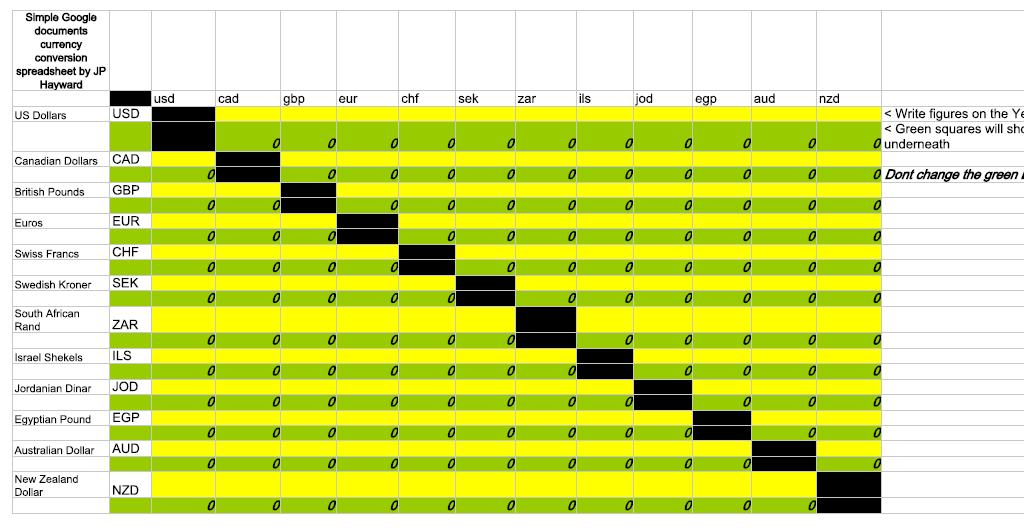
I looked around and couldn’t find something that shows currency conversion in a simple table format I wanted, so I made this one.  Google Documents spreadsheet has an ability to pick live figures of current set of exchange rates, so I decided this would be a good tool for the job.

Please note, I did my best to check the formulas of each cell are correct, feel free to use for any purpose you want but don’t use this for anything too critical.

At the moment this spreadsheet is available for anyone to read or edit, its possible it could get ‘vandalised’ so I have a second protected copy if that happens if it gets interfered with, I need to figure out the sharing rights to let people publicly use this without changing anything

If I could only get text to wrap over multiple cells properly… 🙂

Go to this Google spreadsheet here:- https://spreadsheets.google.com/ccc?key=0AtYywUr33gtSdDFGMWpkRm5VZm15Y0RKdEpscmFyMlE&hl=en

You need a Gmail account to log in.

As a IT professional who is volunteering for a charity in Israel I enjoy creating solutions using technology to make things easier or save money or time, if you find this useful or just want to offer me a tip, feel free to donate the price of a beer or a coffee, using a Paypal account click here. Thank you!!

– NB correction, my blogging host wont let me put a link to Paypal here, so if you feel inclined, just send an amount of your choice to jp.hayward AT gmail.com, thanks!

small laptops and netbooks, Jon test drives and reviews

Most of the people I know here volunteering in one of the several charities in and around Jerusalem have a laptop.  A lot of people have a laptop for just home use as the prefer to access the web in a comfy chair.

Increasingly now, some people are turning to smaller laptops better suited for working on the move.   Netbooks, which came about in the last three years or so, are popular as they are cheap small and enable you to get online anywhere too.

I have serviced and maintained various ultra-mobile computers for my work and for friends, I thought I would give a brief review of what I have found.  It has to be said that with Netbooks, they are compromised on performance and usability to make the cheap and smaller, depending on your requirements this can be a hindrance or perfectly adequate for just working on the move.   Remember, as in most cases there isn’t a DVD drive built in, you have to buy this separately, which means a lot more cost and more to possibly carry around with you, this of course necessary if the computer’s OS crashes and needs to be reloaded again.

Asus EEE 701

This was one of the first netbooks on the market, and when I was working for NICE systems (UK branch of an Israeli software developer) some of my colleagues got some of these from an overseas business trip before they were out in the UK.  Cheapness and lightweight were the main things that appealed here.   The machine is small and light, but the plastic body feels a bit cheap, and the trim looks poor.  The EEE easily flops over as the screen is actually heavier than the base.  The LCD is 1024×600 which is adequate but cramped for anything than word processing and web browsing.   The one I tested had a 3G card onboard for browsing on a phone network, 4Gb SSD (solid state disk, that is a purely non-mechanical flash based memory card that acts as a hard disk)   This is very limited for Windows XP, the one I was using the SSD suddenly stopped working, causing the machine to no longer boot.  After some google searching, these type of SSD disks seem to have questionable reliability and hard to replace as this is a non-standard part and cannot be substituted by a regular hard disk.   The EEEs are popular hackers as some features absent can added by soldering USB wireless sticks inside spare space inside the screen lid.

It has a low performance Celeron 900 processor which is outdated compared today’s popular and cheap Intel Atom chips in most netbooks.  Verdict, the Asus EEE is not a quality system, gets good marks for being one of the first on the market, but can’t be recommended now.  There are numerous newer models of the EEE family. Asus however is a very poor hardware maker, they are well respected by the home built PC crowd, but their web site for support is terrible, and finding drivers is awkward and when getting drivers for my PCs at work, they never have enough bandwidth to provide downloads and suggest using a torrent app to get the drivers (very risky!)  a lot of their drivers are only listed as Beta test versions.   For this reason, in my opinion Asus are only good as a hardware maker for the overclocking PC gaming kids.   For laptops and netbooks the competition is way better, so avoid Asus.

Dell Mini 9 (also known as Inspiron 900)

This was Dells first attempt at a small netbook about 2 years ago.   It belongs to my work and is perfect for working on the move.  It feels solid and well made like most of Dell’s hardware, if you are corporate tech person like me, you will know Dell’s are a joy to support, as you can get drivers quickly and easily from the 7 digit serial number on the bottom.  In terms of compromises, the F keys are missing, requiring the user to press FN and numeric keys along the top to get these, this is actually quite a good cost saving idea and doesn’t impact on the user’s work.  This machine has also a 16Gb SSD disk but I think can be substituted for a regular SATA hard disk, the battery life is really good.   Overall I like the Mini 9.

Acer Aspire One

This is a very respectable Netbook with 1Gb of memory and 160Gb hard disk, seem well made and good performance, nothing that much out of the ordinary, but worth considering.

Compaq Mini 110

This was a friend’s machine, and came bundled with XP Service Pack 3 and Internet Explorer 8.   I had some difficulties getting online as the wireless card seemed flakey, but this was probably due the coffee shop I was in was close to a metal fence cause wireless interference.  Of course like a lot of hardware makers, HP (who bought Compaq) some years ago, preload a fair bit of rubbish onto this machine so annoying browser toolbars and other tat are there as search engine use probably earns HP’s a few quid.   I put on newer wireless drivers and replaced IE with Firefox with the browser icon set smaller to come with the small screen.   Overall this is a nice unit too, with glossy black case and sharp screen and has a decent keyboard usable for people with fat fingers.  Battery life was good too.

HP netbook (unknown but close to above)

I have also used a HP branded machine similar to the above Compaq but silver, privately owned by one of my users but uses it for work.  Has a regular 120Gb hard disk.  My only complaint was the silver paint rubbed off the keys after a years worth of use, and of course installing Adobe Acrobat 9 pro on it, meant the installation didn’t work quite right unless you put it on an external screen.   But of course this is the play off with a system with a 1024×600 screen.  Oh, but there is only ONE USB port on this machine so small external hard disks that have two connectors will have some trouble connecting to this, meaning more costs and silly adapters to carry round with you.

Dell Latitide X1

I use this at my work to do the song lyrics for our worship sessions using an open source app called ‘Open song‘ which is excellent.  The X1 is a proper laptop but not a netbook, so has a Celeron 1.4 processor, full 1024×768 screen and very good keyboard and touchpad, its super lightweight but doesn’t fall over, the battery still seems good considering this machine is 5 years old now.  I did try to open it up to upgrade it, but found there was not available slots to upgrade the memory (it has 256Mb fixed to the motherboard and 512Mb in a single SODIMM slot)  It also has an unusual 1.8″ (like an iPod) style hard disk.   Think this would of been expensive to buy new, and the external DVD writer seems to have gone flakey and needs replacing, but for it ultra lightweight size, this is a excellent no compromise portable system to work anywhere.

IBM Thinkpad X31

I have used these at two places I used to work.  Like all Thinkpads they are hugely expensive for the standard type laptops, even more so for the small form factor units like this.   The X series Thinkpads also have an option snap on base with DVD drive which fixes on securely and can be used with the laptop on the move.  The casing is magnesium alloy, and the hinges and frame of the laptop are very high quality, you have a regular 1024×768 screen, but only IBM’s quirky nipple controller and not a normal touch pad which a lot of users might not like.  The X31 dates from around 2003-04 so very old now but can be bought cheaply second hand.  Thinkpads are now made including newer X series models by Lenovo who bought out IBM’s laptop business, which IBM decided the margins on PC hardware were too thin.

Gigabyte M912

This belongs to my work, this netbook is unusual as it runs XP tablet edition, the screen rotates round on a single central mounted hinge and fold back on it self making it into a full tablet computer.   It has a hard disk of 160gb.  Microsoft produced the tablet edition of XP back in 2003 but it was a failure with just HP and Toshiba producing a few portables using it back then, so it was a surprise seeing this machine with Tablet XP that’s only a couple of years old.   Gigabyte are like Asus, they mainly make clone motherboards, this netbook is not something with even medium quality feel to it, the power switch is a sliding bit of plastic that feels like its about to break off, the silver effect to case looks horrible, and where as the tablet feature in XP is reasonably pleasant to use with slide out pen stylus, I didn’t try and use the handwriting recognition software, but the screen is horrible, its grainy, probably because of the fine mesh type material that is used for the pen, but still not that nice, the keys are tiny also.  There is a bug in the BIOS I think (I put on a update, this didn’t fix it) that causes the machine to hang when started with a USB DVD Drive, all thats needed is to quickly remove and reinsert the USB cable though.  Not recommended.

Toshiba netbook (dunno model sorry)

I quite like Toshiba’s previous laptops, and this one is good although as extremely new in the market runs Windows 7 Starter edition.  Like Apple (and Sony’s Vaio who tend to be the first PC maker to mimic Apple’s features) this has one of the new keyboard with no gaps in between, so less likely to drop crumbs in the keys.   This machines seems pleasant enough to use and has usual netbook 1024×800 screen and 160Gb hard disk – but the Starter edition of 7, intended to completely replace XP home, is not available for casual retail purchase, its only available pre-loaded on low laptops like this, seems heavily compromised compared the regular versions of Win7, you can’t change your Windows wallpaper screen, something that was hugely disappointing to the lady who bough this unit.  I have no doubt that a lot of users will be disappointed that 7 Starter is a backward step from XP in several ways.

Overall, the choice is dependent on taste, certainly price, battery life, physical size, disk storage and performance should be factored into when needing a portable computer.

There’s also tablet computers, in the last month or so Apple’s now famous iPad came about, being a upsized version of the iPhone, and a lot of fans of Apple’s hardware wet themselves with excitement.   I don’t really see the intended target market of it, the unit has to be linked with iTunes with a regular iPod or iPhone, and so its not a self contained computer, I don’t think it easily connects to a company network or even can use a printer.    Theres also Apple’s total control on the apps store which developers and consumers are getting frustrated with lack of choice.  I have not used an iPad, but it has some questions with its usability, do Apple fans want to carry this and an iPhone or iTouch when they go out?   not being an upright device with a stand, having screen reflection has got to be annoyance, no physical keyboard means this isn’t the right device for writers and bloggers surely.    I can see this being a novelty item that people will quickly get tire of, wether they are hardened fans of Apple or users of any brand hardware.  I think it could have some niche for artists using Adobe Illustrator to do work away from their desk or maybe for musicians though.

I haven’t mentioned Linux or Android. Linux was intended to be supplied on netbooks like Asus EEE but quietly disappeared from retail suppliers, due to its more complex, and I don’t think grandma wants to have to enter things in the command line just to install a photo editing app.   My own experience with Linux is I have tried numerous different distros but always not done much more that install it briefly and forget due to having to learn a whole new computing experience.  Has to be said that as well as the free and openness of say Ubuntu its certainly pleasant to use to some degree but having to rely often on a command line to install things puts me off.   Android, being Google and the Open Handset Alliance who wrote a phone operating system based on Linux looks enticing, but the vast array (HTC, Motorola, Samsung, etc) of manufacturers have adapted it to their own method so small computers and phones that runs this, could be fragmented and not so consistent in use, and newer versions of the Android OS, like 2.1 may not be able to some models.

Jonathan is volunteering for a charity in Jerusalem keeping the IT systems running so a busy Christian charity can continue to bless Israel’s families that are in most need.   As I am on a very small allowance to partly pay for me keep here, I am always welcome opportunities to provide consulting, repair advice and servicing to anyone in need of technical issues keeping you from working.   Feel free to contact with any questions or offers of work, he would appreciate any donations in return for assistance on any problems you are facing.

Rebuilding an Arabic PC

Work today was good, got quite a lots done, a computer came in from a friend of staff member, an Arab family who the computer is used by their son.  A very badly dented case with the drive bay covers partly fallen off and a CD drive that was stuck.  Windows XP would not boot, and safe mode, and last known good configuration, and even a repair install from my XP CD would not get it working.

Tried some new tactics which worked quite well to rescue this reasonable spec Athlon 64 PC to remove it from an impossibly tangled up operating system which rendered it completely useless.

Using one of my favourite tools, Hirens boot CD (currently on version 10.2) is my preferred Swiss army knife of dozens of software tools to do all kinds of fixing work.  Some of these apps boot from DOS or from a live version of Windows which starts without touching any of the files of the hard disk of the computer on the bench being tested.  Here I used a tool which scans the hard disk for licence keys for Windows and Microsoft Office.  Here I could find these and write them down on a bit of paper.  Here in the middle east software and DVD piracy is rampant but its not my place to accuse someone breaching a licence of software.  Here this process lets me find the key of the software off the non-bootable hard disk of the computer and keep it safe for re-installation using my own set of media, using their key.

I took a spare 80gb hard disk off my shelf of spare parts, and disconnected the drive from the computer and rested the spare drive on the sideways-turned tower unit of the PC, and set about a fresh install of Windows.  Here I am using XP with Service Pack 3 merged in, after the usual 45 minutes, XP is running and I get the hardware drivers of the web site of the PC board manufacturer.  Then (with no live connection to the internet yet) I put on IE8, and Adobe Acrobat reader, I put in the network connection and put on the free AVG 9 antivirus.  Then I go about putting on all the Windows updates, theres a lot of them, so I can leave it for an hour and continue closing some helpdesk calls, fixing a loud fan on my Talpiyot office PC, checking the network, and also doing face to face support with the users at this site.

Later on, I set up the original (only 10gb) hard disk as a secondary drive and search it for viruses and spyware.  It came up completely clean. Office 2003 got installed with the previously written down licence key.

Next was to copy each of the files of the three user profiles onto the new install of XP from the old installation, all office files, photos and music, browser favourites, etc.  I have done this quite a bit in my old job and is quite easy.  However the profile names are in Arabic which I don’t speak.  But I can use F2 to rename it, but instead of renaming, I copied the highlighted Arabic script to make some new profile names.   Under the language set up in Windows XP I already have Hebrew and Arabic as well as US English, so its easy to change the keyboard layout to either of these three.

Incidentally a new challenge I found was Windows XP language set up shows multiple variations of Arabic, for various nations such as Saudi Arabia, Morocco, Kuwait, Qatar, Jordan, Egypt, etc, as there is no option for Israeli or Palestinian Arabic, I chose Jordanian Arabic I guess would be the closest.

Now all the files salvageable were on the new build of the computer.   There were some games and language translation software but without the media these would need to be reinstalled by the user.  I decided to clone using Norton Ghost the contents of the hard disk that was property of my work to the original drive inside the computer.   The files copied across perfectly but again Windows crashed when starting.   It was here I decided the original 10gb drive was defective, so I put it in the bin, and my manager was happy to give this old drive as a gift to this user, as I had plenty of spares.

As the case on this PC looks battered and damaged, I took the chance to transplant over the whole innards to the now empty chassis of another clone PC which looks a lot nicer, plus there’s a replacement CD drive in it (I tend to throw old CD drives away as all PCs used by volunteers and staff have new DVD writers.  I wrote a letter and taped it to the computer to explain the work I had done and hope they enjoy the completely overhauled machine.

Jonathan is well conversed in doing helpdesk and support across several countries and continents for this current role and my previous regular paid jobs.  He is looking for sources of financial help as I provide the backbone of IT assistance to a busy charity in the holyland, both face to face, using remote software, or even ‘blind’ by talking through users through using icons, menus or commands from memory. If you would like consulting or support of any kind of IT challenge for your home or business PC or laptop in exchange for a small financial gift please do get in touch. :o)

Why Twitter = Twaddle

Some people who know me know I don’t like Twitter.

I have an account and its really only to promote this site, on some people I follow occasionally something could be interesting on IT, the middle east and various other topics that interest me.   Often Twitter is used as a casual way of running commentary of your life, as below:

MrXYZ – The number 7 bus is 6 minutes and 24.54 seconds late

about 2 hours ago
On my Texas Instruments scientific calculator

MrXYZ – I am putting on some trousers
about 3 hours ago
On the web

You also have people following VIPs, with people such as Stephen Fry who are the most followed people.  Stephen is absolutely brilliant man and a genius of acting, speaking and writing, one of the absolute legends of Britishness.  Its no secret he suffers from depression, but I think if you are going through something like this, its better to phone up or see a close friend and spill out what’s troubling you rather than write it online, like what happened recently when he ceased using Twitter for a short while due to he perceived as being people mocking or being unkind about something that was troubling him.

Gowala is one of the pointless add ons I see with iPhone users I see, “I am in blahblah pub” or such and such a place, as if anyone would ever care.

I don’t have an iPhone I only have a fairly simple clamshell type handset, mainly because where as I just need to make calls, I used to like the Voice notes feature which used to be on almost Motorola handsets in the last 10 years or so, press the side button where you can record your voice (including in a call)  and then set it to a alarm message, which was a brilliantly simple feature which needs a minimum of button pressing to keep something an important reminder, sadly my current now two year old V8 phone doesn’t have this.   I would quite like to have some simple version of Google documents and Gmail, seeing as I like to type notes and access to brief writings of things to do on any computer anywhere on the internet, with this I have more or less dumped my need to use Microsoft Office or Open Office now, or remember which of my work or home PCs or USB sticks I saved something on.  For this reason I might opt for Android phone at some point in the future.  The iPhone is a very slick and well designed piece of kit, I am not knocking it, its just I don’t want to pay £600 for 18 months worth of ownership for a phone, be it, by a contract or pay as you go.

Because of the portable, update from on the toilet or anywhere nature of Twitter, people may write things when they are angry, emotionally damaged or drunk, this could lead to writing things you later regret and at worse could cost a relationship or career.

I quite like blogging.  Twitter has meant a few people I have seen that used to blog, don’t bother any more and only put small snippets of the things that interest them on Twitter instead which is sad.   One of the things I like blogging as articles stay there on the internet indefinitely, so a helpful how-to on doing something I have learnt or want to share with the rest of the world, the ethic the internet should be; sharing what you know and learn what you don’t.  With articles of Twitter no one cares what you wrote yesterday, and I am not even sure if old tweets can be found with Google.

Like Facebook its often a vehicle to spread rumors and weighs on peoples naivety with the huge potential to spread scams and spam.   For instance today, as its April fool’s day, apparently numerous fake stories ended up on some newspapers as fact.  I also sometimes worry about those short URL type sites that condense web addresses into something brief that make it fit into the limited amount of space for a tweet, this could send you to something quite unsavoury or dangerous.

I think its likely the Twitter will get replaced by something better and will probably fade away after a couple of years or so.

Maybe an analogue version of Twitter would be to wear a hat and put some velcro letters on about what you are upto?

The only thing I do like about is purely to point people towards a more detailed writing about something, a free taste of a more detailed piece of information.

Using WordPress is a template for my blog I have mixed opinions on.  Its great that its free and has many different features to edit and change things how you like it, its not at all standards compliant, and changing the the layout of your blog often makes formatting go screwy, what’s in the draft layout is not always what you get in the final published result.  There’s also Blogger (owned by Google) and some other ones which are also free, and good as a ready to run way to blog without needing web developer background.  I like to call this freeze dried web design.  You use your own creative knowhow to write the content and there is a pre-fabricated template to put it all together.

I like and deeply hate Facebook at the same time as well, but that’s for article another day.

Jerusalem part 2 starts March…

part 2 of my travels in volunteering for Bridges for Peace, a Christian charity that helps poor Jewish people in Israel, is almost here.

I am flying to Tel Aviv from Luton on 16th of March.  At the moment I have this ‘what the heck have I just done’ type feeling as flight was quite a bit more (£270) than I thought it would be with Easyjet, being not much less than a regular non-budget airline I flew with last year, and that I have less than two weeks to plan everything else and go..

If you click here you can see some figures of what I need in financial support for this year.   This is a voluntary role, I get an allowance (not a salary, I am still a volunteer) in some of my costs like rent and bills, but need probably about an extra £300 a month to live, I have to buy one more flight, as I am coming home in May to go to a friend’s wedding in Spain then see my sister and her new baby than head back.

My writings here only account for about 20% of the places I have been to into middle east, I intend to write plenty more.  Of course if there are certain sights and places you would like to read more on, feel free to ask.

I would of course appreciate prayer as well, I have a great many challenges coming up soon..

getting a little extra cash back from online shopping – my thoughts

For the last few weeks I have been doing online shopping with Top Cashback.

Originally saw this company mentioned quite a bit on MoneySavingExpert.com, so it is a legit operation and its quite popular now, it offers you cash back from buying anything online.  Most of the time its things I buy from retailers I use regularly.  It cost absolutely nothing to join and doesn’t need any commitment of any kind.

The way this works is you have to go onto the the Top Cashback web site first then do a search for a type of product (ie: car insurance, DVDs etc) you want buy or a retailer (Boots, HMV, confused.com, etc)   and then go and buy what you want, your browser relays what you have bought back to the web site who give you something back, easy.

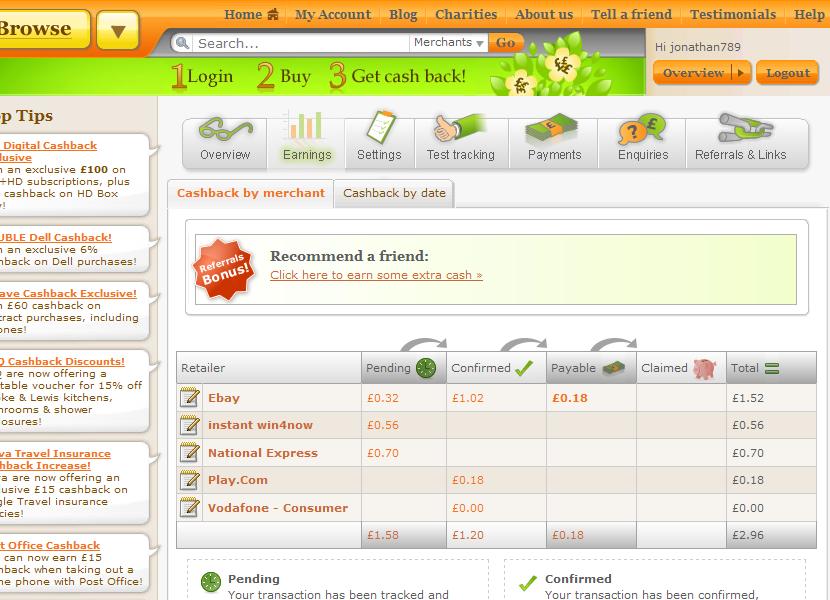
Open this picture bigger and you can see what I have been using it recently.

So is it worth it?  Well, its not a get rich quick scheme, but I have got back nearly £3 which isnt too bad, as I have only signed up since about the beginning of this year.  This might not seem much, but BIG amounts of money can be made on things like insurance or a mobile contract (£50, £100 or more)   so this is definitely worth considering.   I havent bought much seeing as I am not employed, I have bought a few computer bits of ebay in order to fix some old computers up to make them saleable.  In doing so, I probably only get 30 pence for £5 I have spent.   Ebay’s cashback is something like 40% of their fees they charge the seller, that the buyer can get back.  You can see I bought a bus ticket to get from Luton airport to Stansted airport as I will be getting off one flight onto another to go to Spain in May, this ticket cost me £11.70, so 70p back isnt bad, usually (when I am normal employment) I get a bus from Portsmouth to London about 3 or 4 times a year to go shopping, see friends or go to a museum which is about £13 return, so a bit of money back there pays for a bottle of coke or something.  Play.com (I think they must be second to Amazon now, for biggest online retailer in the UK)  give you 1-8%, they tend to be the cheapest place to get DVDs anyhow without this, here I just bought one CD for £7.99.   I used Vodafone to get a pay as you go SIM card which was free and doesnt get you any incentive as I wanted to switch from Orange due to their poor service lately, but O2 and Orange offer a small (50p or so) amount of cash back for free issue prepay SIM cards and a very good amount for a new phone contract.   In some cases two seperate offers can work together for even more savings.   If you are a first time user of Tesco’s online food shopping service they can give you £10 of £50 (if I remember correctly) but more money off on top of that if you use the discount codes that are widely on the internet and click to join from topcashback.

To make the cashback work successfully you need to check your computer can ‘track’, this means using the test tracking feature on the web site to ensure that your PC will tell the retailer that topcashback have sent you there, so they can acknowledge that you should have some payment.   Sometimes when buying this might not work, so there is a manual way of chasing up any money that doesn’t show on the list of things bought recently.

The way they can afford to give the public back their money is if you think of a real physical shop which has middlemen who earn a commission in between a product comes from a wholesaler to your shopping basket, so does the online retail industry.   Therefore companies, Google being the biggest of all earn a small portion of something you pay for if you go and search for buying something via Google’s site or one of their ads.   So imagine if one of those companies actually shares some of the commission with you, the customer and you get to keep it, well that is quite nice really.   They just want to pay a bit to someone who can point them in the direction of new business, it also happens that car insurance and mobile phone stores pay their salesman good fees if they make a sale, and at the same time you have some of that cash for yourself if you know where to look.

Tips to gain cashback successfully:-

  • – Always click onto Topcashback web site then search for the retailer’s site from there, otherwise it won’t work.
  • – Don’t change things on your browser settings (like clearing cookies or settings) whilst shopping online, this might remove the evidence you have bought from that particular shop.
  • – If the cashback tracking records doesn’t show up anything, check their web site for help on how to chase it up.

So, in all I would recommend that may be 6 months worth of casual small spending on popular online retailers could get you enough money to get a discounted DVD, or with more generous deals maybe quite a bit more.   Either way I wont bother earning points with Airmiles any more I reckon. 🙂

Online   Cashback

Of course, they offer me a small commission of £1 if someone gets a recommendation from me and goes to collect £5 worth of money back from places you have spent at.   If you (UK residents only) could be so kind to click the above banner and join even if you are just casually curious, this would be most helpful to provide a tiny bit extra to my travels to Israel in a few weeks.

software review: Truecrypt – free and effective file encryption

Are you a laptop user and work away from home or office?
Do you carry around confidential files on a USB stick, external hard drive or on CDs/DVDs?
Have you thought about what would happen if a computer or media was lost or stolen?
Are you a company director or IT manager and thought about what would happen if your staff with the above scenarios?

You should have encryption software!!

I have been using a free piece of software called Truecrypt for my own use in storing lists of passwords and other sensitive files, not only is it free it offers are very high level encryption and can be used interchangeably between Windows, Macs and Linux computers.

I firstly used this app as when I was working for Southampton NHS trust, a user was given a CD with patient data from an organisation who were authorised to deal with a patient’s records, possibly for the purposes of a patient whose medical history was needed to be accessed another clinical authority while they were travelling in another country for treatment.  Although the trust didn’t officially use or support this app, my manager was ok for me to supply this employee that needed the files.  So I quickly installed Truecrypt on her laptop and using the password she was given by email got the files for her, this of course meaning if the CD was intercepted by a third party it would be useless.

Using Truecrypt means you build a virtual drive of a size of your choice, several kilobytes, megabytes or gigabytes, and a drive letter (for instance X: ), chose a password, copy your files to the drive, then the virtual drive can be closed when not needed, the virtual drive exists as a file on any type of media, so you dont necessarily need to give it the .tc extension so a possible unauthorised person probably wouldn’t know it even exist.   If you do give it the right filename extension, then you can just double click on the files, let say, secret.tc and Truecrypt will start up and prompt you to enter a password for it.  If you wish to close your encrypted drive you can just right click on the blue Truecrypt icon on the task bar and dismount this drive (the drive X: will disappear from your My Computer folder)   you can then eject the CD or USB stick if needed, and if you click on Start then ‘Recent documents’, any file names you were working on will vanish from there, no one will know on your PC you have been accessing them.

I personally think deploying this app for a private individual or a business should be quite simple as long as the follow factors are put in place:-
– If a CD or USB stick has encrypted if used on someone else’s (a client let say, that a salesman visits)  they will need to have the Truecrypt client installed, or you can run it straight from the USB stick rather than install it on the host computer.
– If the password is forgotten, the files will be absolutely impossible to access!   A clear policy on passwords should be done, maybe just one for all staff of a department might be a good idea.   Truecrypt actually recommends at least 20 (!) characters in a password for maximum security.
– A clear policy on how big the encrypted drives needs to be.   For instance if everyone creates a 1gb or more drive but actually only uses a small portion of this, and they store it on their network drive, then that could become a big waste of disk space on the server.
– Don’t touch the other features in the app unless you know precisely what they do in case it could render your files impossible to read.
– Like any new change in IT, users should be trained and IT support teams should have some documentation for them to follow so it becomes familiar in everyday use.  Things should be well rehearsed in case, lets say, you are about to a presentation in front of some people and huge embarrassment could happen if you cant get at the file.

Truecrypt also has other features, ie: can encrypt the whole of a laptop’s hard disk sector by sector.  This is a good idea as it is pathetically easy to crack an Windows administrator password on a laptop with the right boot CD (had to do with when my previous employer gave me a laptop of a salesman who just got fired and the administrator password of his laptop was changed to something unknown.)   I have not used this feature of this app yet but I have used rival products from Symantec and PGP – which were not free and cost my former employees a lot for licences)

This program is a really good example how open source apps can come up trumps in doing a task well for zero costs rather than forking our money for individual paid for licences for an equivalent app from another software maker, and unlike Microsoft’s BitLocker which comes with Vista and 7, Truecrypt has the edge in working transparently between any version of Windows, Macintosh and Linux environments.  I don’t pretend any app is perfect but this seems like a excellent solution with 256 bit encryption meaning getting round a password would need a specialist criminal very, very determined for weeks to have any chance of getting at those documents.

Jonathan would be pleased to provide you with further consulting on this application by email or phone in return for donations for his second trip to volunteering in Jerusalem, he would gladly accept any ideas on funding for my flights, insurance and costs, he is experienced in supporting many different applications both typical traditional Microsoft business applications and equivalent free alternatives.

Jonathan likes the benefits of free and open source software, as well as the obvious plus of not having any cost for the application, its good to be free of complex, confusing and restrictive licence agreements and having the source code available in the open has a degree of accountability as flaws and bugs can often be spotted and fixed quickly with a wider team of developers, tools used in business tend to be designed to be more closer to the way people work and to open standards, meaning better integration between other software.  He has a sharp eye for possible security threats in previous places he has contracted at, wether it maybe a non-encrypted wireless network that could let an unauthorised person in a company network, strange search toolbars in a browser which is a sign of a possible spyware application present, or an absent or disabled antivirus client, amongst flaws which are very real dangers for any business.