Google Documents and cloud computing

Warning geek stuff, skip this if email and web apps are not your thing 🙂

The big trend these days is cloud computing, a buzzword talked about a lot by IT managers and vendors of IT services alike.  Looking after servers isnt a nice task, as the average IT administrator worries about possible threats (electricity fails, overheating, unauthorised persons get into the room, hackers, making sure backups are done, hardware failure, fires or floods) that could take those servers offline.

Cloud computing, is just a term for putting all your data on a server managed elsewhere, by a dedicated hosting company, they keep all the servers in a nice safe purposed designed building that should be looked after by specialists, has power protection and back ups of all the data in case of a physical hardware failure causing files to be lost.  It makes more sense to do it this way and takes a huge burden off the IT team.

Google is the biggest supplier of cloud services in the world, as well as a lot of their services are free.   Instead of buying the server hardware, pay for the server operating system (ie: Windows Server 2008) and mail management system (Exchange 2010)  the organisation I work for just have Google do all of the work of hosting the mail for us.

I started using a normal version of Gmail for my own personal use about 7 years ago and have not looked back.   Now Google do a business version of this which is more or less the same, you get to assign a domain name fred@fredstropicalfish.com and the IT person in the company has a admin console which they can add, change, suspend or delete accounts, just a few minutes work to add a new member of staff.

For the free package you have 500 mail accounts and 7Gb of email per person.  The most one of our staff has used in 55%.  Support is not included, get an issue and you are on your own searching to find out what is wrong, alternatively the paid accounts have 24 hour telephone support.   Obviously Google use their hugely successful adverts to get revenue from the free accounts.

Last week I moved over four of our users off an old POP3 (term for mail account provided from a specific mail account, (in UK: Orange/Wannado/Freeserve, Talktalk, Tiscali, AOL, Virgin, BTconnect, in Israel: Walla, Netvision, Bezeq etc)  to one hosted by Gmail.   This has a great many benefits, the mail is stored on Google’s servers and not onto your own computers, so a hard disk fails on your computer, you will not lose everything.  I could copy everything of the POP3 mail account to Gmail using some free dedicated tools that did all the hard work provided by Google.  Calenders and address books are all copied over too.   Now the staff can work anywhere (if they are ill or on holiday they can work from home)  or on a mobile device.

But as well as a huge and free mail systems, Google are heading for a showdown with Microsoft to not only steal people away from Outlook for email, but from Word and Excel as well.

I rarely use Word and Excel now, and like the idea of writing documents, drafts for my blog, to do lists, documentation for work with Google Documents and get at it from any computer anywhere on the internet.
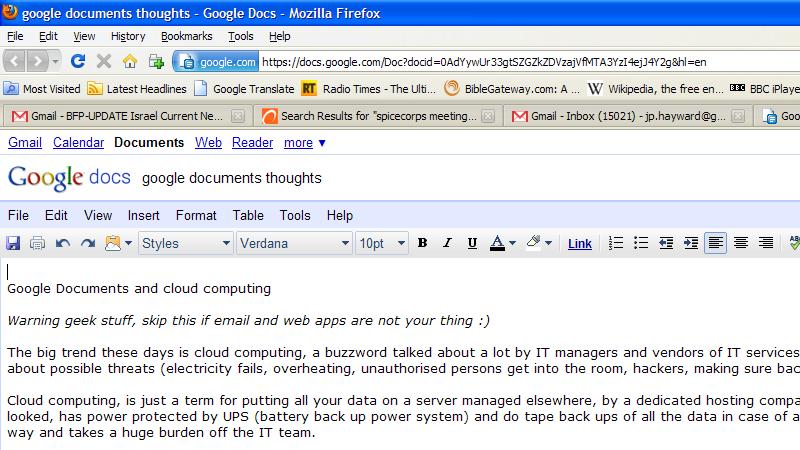
Its still needs a bit of time to mature I think as a substitute for Microsoft’s Word and Excel, but Google Apps is indeed a jolly good package of web based apps you can use anywhere.

Being able to collaborate on a single document amongst a team of people, gives you some big advantages if say, a technical manual, Bob can edit the first few pages and Gary and put in an index at the end.  This can speed up working on large more complex documents, rather than have email attachments to and fro and worry about who has the most recent copy of a document, when instead its stored in one central place and everyone can get at it.

Possible limitations and issues.

Gmail does not support sending or receiving read receipts.  Outlook has a feature when sending a mail which is important to force the user to send an acknowledgment they got it.

Clicking on an email link on a web site does not have a way of opening a new tab in your browser to send a mail to that link.  Instead you are likely to get crummy old Outlook Express or Outlook (even if not configured to persuade you send mail that way.   I think this could be fixable with an extension for Firefox or Chrome.

The British spell checker extension for Firefox only intermittently works.  (Although seems to want to force me to use American spelling!)

The word processor app has the text cursor disappear sometimes, not sure why.  Means I can still type ok.

Google Spreadsheets doesn’t allow text put in cells (especially when writing titles at the top of a sheet) to flow over to the next cell like Excel does.  There is got to be a simple way around this I am sure, I just need to read up on this some point.

Software update roll outs

In the world of traditional locally installed software, no IT administrator worth his salt rolls out an update for a software package in a live commercial environment without testing if first.  Small discrete changes in a new app can break functionality in a business’s own set up, and can be hugely difficult to track down.

Therefore with software offered as a service, a current version and new version should be running in tandem in order for people to test and make sure it all works correctly as well as letting users familiarising themselves with it.  Users get upset if things get changed around unexpectedly.

So when improvements are announced, I am hoping Google can let us try the new versions a little at a time to make sure there are no compatibility problems.

We had some headaches with our users trying to add attachments to emails once, this issue was the same on PCs and Macs, IE, Firefox or Chrome.   Searched the web for a solution.  Nothing.  Possibly bug that Google hasn’t owned up to, or issue with Israel hosted Gmail accounts maybe.

Security and accountability

When I left Israel before, my administrator rights over my Google Apps got revoked suddenly.  The rest of my team did not disable my account.

It turns out this is a security feature as (it would seem) when I was trying to access my account back on a UK IP address (instead of a Israel IP) flagged this as suspicious activity.   I guess this is a good idea, but it would of been nice for my colleagues to get some warning of this to work out why.

One of email accounts on our systems disappeared suddenly.  I had been deleting some redundant accounts the week before.  I thought I had double checked everything very carefully, but it might of been my fault.

Therefore, a status windows of recent activity I think is really in order.   I am going to imagine that a fictional company called Freds Tropical Fish has three IT administrators called Bob, Gary and Sheila.  This week Sheila is newly hired so her colleagues create her on the system.

1.45 17/6/10 Bob has created user – salesenquiries@fredstopicalfish.com
4.24 16/6/10 Sheila has deleted – oldinvoices@fredstopicalfish.com               [undo]
9.28 14/6/10 Gary has given user – sheila@fredstopicalfish.com   – admin rights
9.14 14/6/10 Gary has created user – sheila@fredstopicalfish.com

Really just a box with recent activity is needed, then I know if its my fault I deserve to getting a kicking for deleting something by accident 🙂

Google being the largest player of Cloud services in the world ought to have another impartial organisation just arbitrate over privacy and security, following a scare over Google’s camera cars that took the streemap pictures were also listening in on people’s wireless networks, Google said they apologised and they weren’t supposed to be recording this particular information.

With its world leading infastructure and rumours that the NHS could store patient records there, this could be physically possible, but some kind of trusted third party authority to make sure data is held securely there would give people peace of mind.

Co-location.

I would like to see some actual site Google can show how their system fails-over in the event of a outage at one it data centres.  I am assuming there is plenty of co-location (ie: my files are hosted in two different physical locations)  in case of something severe, lets say a fire broke out affecting a server.

Hey Google, you could even use Google Maps with pins to show where your data centres with pins showing, with live stats of any possible issues and what the procedure is for fail-over if one of those has an outage.

This is particularly worth thinking about in Israel where there is always the threat of war.

3G mobile support

If a user is on a laptop out in the field away from a regular network connection, they maybe on a 3G cellular modem.  These things can be expensive offering pay per megabyte metered usage.  Here network connection should be done in such a way to only use a small measured amount of bandwidth as and when necessary and caching the work locally on the PC’s hard disk.

I have a friend who does support in South Africa where domestic broadband availability is a rarity and expensive, this would be useful for him.

Cyberattacks.

Google admitted there was a security vulnerability. If they are honest about it and takes steps to fix it swiftly then this is fine, all software has security holes which need to have updates put on regularly.


Training and online help

This is probably the most tricky aspect of the whole thing is getting users familiar with using it.

Here is some ideas.

Microsoft put a nice thoughtful bit of assistance for their users moving up from a rival product.

Look at Microsoft’s Word and you can see help for those used to using Word Perfect which was a popular word processor in the 1990s.

With the older versions of Excel, (sorry don’t have a picture) you can see what to learn for users that were on Lotus 123.

Mozilla does this with Firefox too. 🙂

So, Google could offer some help that shows a list of shortcuts of what user may need to get used to when changing from Microsoft Office.

Overall I am very happy with the way Google documents/apps works, ease of merging in old mail accounts from another provider and look forward to when new features and improvements are released, there is growing better integration with things like maps and language translation as well which are enormously useful too.  I like the fact if your wireless drops on your laptop, its not an issue as a document is saved every one minute or so, so it should be safe in the event of loss of network connection, or the PC crashes or loses power.

small laptops and netbooks, Jon test drives and reviews

Most of the people I know here volunteering in one of the several charities in and around Jerusalem have a laptop.  A lot of people have a laptop for just home use as the prefer to access the web in a comfy chair.

Increasingly now, some people are turning to smaller laptops better suited for working on the move.   Netbooks, which came about in the last three years or so, are popular as they are cheap small and enable you to get online anywhere too.

I have serviced and maintained various ultra-mobile computers for my work and for friends, I thought I would give a brief review of what I have found.  It has to be said that with Netbooks, they are compromised on performance and usability to make the cheap and smaller, depending on your requirements this can be a hindrance or perfectly adequate for just working on the move.   Remember, as in most cases there isn’t a DVD drive built in, you have to buy this separately, which means a lot more cost and more to possibly carry around with you, this of course necessary if the computer’s OS crashes and needs to be reloaded again.

Asus EEE 701

This was one of the first netbooks on the market, and when I was working for NICE systems (UK branch of an Israeli software developer) some of my colleagues got some of these from an overseas business trip before they were out in the UK.  Cheapness and lightweight were the main things that appealed here.   The machine is small and light, but the plastic body feels a bit cheap, and the trim looks poor.  The EEE easily flops over as the screen is actually heavier than the base.  The LCD is 1024×600 which is adequate but cramped for anything than word processing and web browsing.   The one I tested had a 3G card onboard for browsing on a phone network, 4Gb SSD (solid state disk, that is a purely non-mechanical flash based memory card that acts as a hard disk)   This is very limited for Windows XP, the one I was using the SSD suddenly stopped working, causing the machine to no longer boot.  After some google searching, these type of SSD disks seem to have questionable reliability and hard to replace as this is a non-standard part and cannot be substituted by a regular hard disk.   The EEEs are popular hackers as some features absent can added by soldering USB wireless sticks inside spare space inside the screen lid.

It has a low performance Celeron 900 processor which is outdated compared today’s popular and cheap Intel Atom chips in most netbooks.  Verdict, the Asus EEE is not a quality system, gets good marks for being one of the first on the market, but can’t be recommended now.  There are numerous newer models of the EEE family. Asus however is a very poor hardware maker, they are well respected by the home built PC crowd, but their web site for support is terrible, and finding drivers is awkward and when getting drivers for my PCs at work, they never have enough bandwidth to provide downloads and suggest using a torrent app to get the drivers (very risky!)  a lot of their drivers are only listed as Beta test versions.   For this reason, in my opinion Asus are only good as a hardware maker for the overclocking PC gaming kids.   For laptops and netbooks the competition is way better, so avoid Asus.

Dell Mini 9 (also known as Inspiron 900)

This was Dells first attempt at a small netbook about 2 years ago.   It belongs to my work and is perfect for working on the move.  It feels solid and well made like most of Dell’s hardware, if you are corporate tech person like me, you will know Dell’s are a joy to support, as you can get drivers quickly and easily from the 7 digit serial number on the bottom.  In terms of compromises, the F keys are missing, requiring the user to press FN and numeric keys along the top to get these, this is actually quite a good cost saving idea and doesn’t impact on the user’s work.  This machine has also a 16Gb SSD disk but I think can be substituted for a regular SATA hard disk, the battery life is really good.   Overall I like the Mini 9.

Acer Aspire One

This is a very respectable Netbook with 1Gb of memory and 160Gb hard disk, seem well made and good performance, nothing that much out of the ordinary, but worth considering.

Compaq Mini 110

This was a friend’s machine, and came bundled with XP Service Pack 3 and Internet Explorer 8.   I had some difficulties getting online as the wireless card seemed flakey, but this was probably due the coffee shop I was in was close to a metal fence cause wireless interference.  Of course like a lot of hardware makers, HP (who bought Compaq) some years ago, preload a fair bit of rubbish onto this machine so annoying browser toolbars and other tat are there as search engine use probably earns HP’s a few quid.   I put on newer wireless drivers and replaced IE with Firefox with the browser icon set smaller to come with the small screen.   Overall this is a nice unit too, with glossy black case and sharp screen and has a decent keyboard usable for people with fat fingers.  Battery life was good too.

HP netbook (unknown but close to above)

I have also used a HP branded machine similar to the above Compaq but silver, privately owned by one of my users but uses it for work.  Has a regular 120Gb hard disk.  My only complaint was the silver paint rubbed off the keys after a years worth of use, and of course installing Adobe Acrobat 9 pro on it, meant the installation didn’t work quite right unless you put it on an external screen.   But of course this is the play off with a system with a 1024×600 screen.  Oh, but there is only ONE USB port on this machine so small external hard disks that have two connectors will have some trouble connecting to this, meaning more costs and silly adapters to carry round with you.

Dell Latitide X1

I use this at my work to do the song lyrics for our worship sessions using an open source app called ‘Open song‘ which is excellent.  The X1 is a proper laptop but not a netbook, so has a Celeron 1.4 processor, full 1024×768 screen and very good keyboard and touchpad, its super lightweight but doesn’t fall over, the battery still seems good considering this machine is 5 years old now.  I did try to open it up to upgrade it, but found there was not available slots to upgrade the memory (it has 256Mb fixed to the motherboard and 512Mb in a single SODIMM slot)  It also has an unusual 1.8″ (like an iPod) style hard disk.   Think this would of been expensive to buy new, and the external DVD writer seems to have gone flakey and needs replacing, but for it ultra lightweight size, this is a excellent no compromise portable system to work anywhere.

IBM Thinkpad X31

I have used these at two places I used to work.  Like all Thinkpads they are hugely expensive for the standard type laptops, even more so for the small form factor units like this.   The X series Thinkpads also have an option snap on base with DVD drive which fixes on securely and can be used with the laptop on the move.  The casing is magnesium alloy, and the hinges and frame of the laptop are very high quality, you have a regular 1024×768 screen, but only IBM’s quirky nipple controller and not a normal touch pad which a lot of users might not like.  The X31 dates from around 2003-04 so very old now but can be bought cheaply second hand.  Thinkpads are now made including newer X series models by Lenovo who bought out IBM’s laptop business, which IBM decided the margins on PC hardware were too thin.

Gigabyte M912

This belongs to my work, this netbook is unusual as it runs XP tablet edition, the screen rotates round on a single central mounted hinge and fold back on it self making it into a full tablet computer.   It has a hard disk of 160gb.  Microsoft produced the tablet edition of XP back in 2003 but it was a failure with just HP and Toshiba producing a few portables using it back then, so it was a surprise seeing this machine with Tablet XP that’s only a couple of years old.   Gigabyte are like Asus, they mainly make clone motherboards, this netbook is not something with even medium quality feel to it, the power switch is a sliding bit of plastic that feels like its about to break off, the silver effect to case looks horrible, and where as the tablet feature in XP is reasonably pleasant to use with slide out pen stylus, I didn’t try and use the handwriting recognition software, but the screen is horrible, its grainy, probably because of the fine mesh type material that is used for the pen, but still not that nice, the keys are tiny also.  There is a bug in the BIOS I think (I put on a update, this didn’t fix it) that causes the machine to hang when started with a USB DVD Drive, all thats needed is to quickly remove and reinsert the USB cable though.  Not recommended.

Toshiba netbook (dunno model sorry)

I quite like Toshiba’s previous laptops, and this one is good although as extremely new in the market runs Windows 7 Starter edition.  Like Apple (and Sony’s Vaio who tend to be the first PC maker to mimic Apple’s features) this has one of the new keyboard with no gaps in between, so less likely to drop crumbs in the keys.   This machines seems pleasant enough to use and has usual netbook 1024×800 screen and 160Gb hard disk – but the Starter edition of 7, intended to completely replace XP home, is not available for casual retail purchase, its only available pre-loaded on low laptops like this, seems heavily compromised compared the regular versions of Win7, you can’t change your Windows wallpaper screen, something that was hugely disappointing to the lady who bough this unit.  I have no doubt that a lot of users will be disappointed that 7 Starter is a backward step from XP in several ways.

Overall, the choice is dependent on taste, certainly price, battery life, physical size, disk storage and performance should be factored into when needing a portable computer.

There’s also tablet computers, in the last month or so Apple’s now famous iPad came about, being a upsized version of the iPhone, and a lot of fans of Apple’s hardware wet themselves with excitement.   I don’t really see the intended target market of it, the unit has to be linked with iTunes with a regular iPod or iPhone, and so its not a self contained computer, I don’t think it easily connects to a company network or even can use a printer.    Theres also Apple’s total control on the apps store which developers and consumers are getting frustrated with lack of choice.  I have not used an iPad, but it has some questions with its usability, do Apple fans want to carry this and an iPhone or iTouch when they go out?   not being an upright device with a stand, having screen reflection has got to be annoyance, no physical keyboard means this isn’t the right device for writers and bloggers surely.    I can see this being a novelty item that people will quickly get tire of, wether they are hardened fans of Apple or users of any brand hardware.  I think it could have some niche for artists using Adobe Illustrator to do work away from their desk or maybe for musicians though.

I haven’t mentioned Linux or Android. Linux was intended to be supplied on netbooks like Asus EEE but quietly disappeared from retail suppliers, due to its more complex, and I don’t think grandma wants to have to enter things in the command line just to install a photo editing app.   My own experience with Linux is I have tried numerous different distros but always not done much more that install it briefly and forget due to having to learn a whole new computing experience.  Has to be said that as well as the free and openness of say Ubuntu its certainly pleasant to use to some degree but having to rely often on a command line to install things puts me off.   Android, being Google and the Open Handset Alliance who wrote a phone operating system based on Linux looks enticing, but the vast array (HTC, Motorola, Samsung, etc) of manufacturers have adapted it to their own method so small computers and phones that runs this, could be fragmented and not so consistent in use, and newer versions of the Android OS, like 2.1 may not be able to some models.

Jonathan is volunteering for a charity in Jerusalem keeping the IT systems running so a busy Christian charity can continue to bless Israel’s families that are in most need.   As I am on a very small allowance to partly pay for me keep here, I am always welcome opportunities to provide consulting, repair advice and servicing to anyone in need of technical issues keeping you from working.   Feel free to contact with any questions or offers of work, he would appreciate any donations in return for assistance on any problems you are facing.

software review: Truecrypt – free and effective file encryption

Are you a laptop user and work away from home or office?
Do you carry around confidential files on a USB stick, external hard drive or on CDs/DVDs?
Have you thought about what would happen if a computer or media was lost or stolen?
Are you a company director or IT manager and thought about what would happen if your staff with the above scenarios?

You should have encryption software!!

I have been using a free piece of software called Truecrypt for my own use in storing lists of passwords and other sensitive files, not only is it free it offers are very high level encryption and can be used interchangeably between Windows, Macs and Linux computers.

I firstly used this app as when I was working for Southampton NHS trust, a user was given a CD with patient data from an organisation who were authorised to deal with a patient’s records, possibly for the purposes of a patient whose medical history was needed to be accessed another clinical authority while they were travelling in another country for treatment.  Although the trust didn’t officially use or support this app, my manager was ok for me to supply this employee that needed the files.  So I quickly installed Truecrypt on her laptop and using the password she was given by email got the files for her, this of course meaning if the CD was intercepted by a third party it would be useless.

Using Truecrypt means you build a virtual drive of a size of your choice, several kilobytes, megabytes or gigabytes, and a drive letter (for instance X: ), chose a password, copy your files to the drive, then the virtual drive can be closed when not needed, the virtual drive exists as a file on any type of media, so you dont necessarily need to give it the .tc extension so a possible unauthorised person probably wouldn’t know it even exist.   If you do give it the right filename extension, then you can just double click on the files, let say, secret.tc and Truecrypt will start up and prompt you to enter a password for it.  If you wish to close your encrypted drive you can just right click on the blue Truecrypt icon on the task bar and dismount this drive (the drive X: will disappear from your My Computer folder)   you can then eject the CD or USB stick if needed, and if you click on Start then ‘Recent documents’, any file names you were working on will vanish from there, no one will know on your PC you have been accessing them.

I personally think deploying this app for a private individual or a business should be quite simple as long as the follow factors are put in place:-
– If a CD or USB stick has encrypted if used on someone else’s (a client let say, that a salesman visits)  they will need to have the Truecrypt client installed, or you can run it straight from the USB stick rather than install it on the host computer.
– If the password is forgotten, the files will be absolutely impossible to access!   A clear policy on passwords should be done, maybe just one for all staff of a department might be a good idea.   Truecrypt actually recommends at least 20 (!) characters in a password for maximum security.
– A clear policy on how big the encrypted drives needs to be.   For instance if everyone creates a 1gb or more drive but actually only uses a small portion of this, and they store it on their network drive, then that could become a big waste of disk space on the server.
– Don’t touch the other features in the app unless you know precisely what they do in case it could render your files impossible to read.
– Like any new change in IT, users should be trained and IT support teams should have some documentation for them to follow so it becomes familiar in everyday use.  Things should be well rehearsed in case, lets say, you are about to a presentation in front of some people and huge embarrassment could happen if you cant get at the file.

Truecrypt also has other features, ie: can encrypt the whole of a laptop’s hard disk sector by sector.  This is a good idea as it is pathetically easy to crack an Windows administrator password on a laptop with the right boot CD (had to do with when my previous employer gave me a laptop of a salesman who just got fired and the administrator password of his laptop was changed to something unknown.)   I have not used this feature of this app yet but I have used rival products from Symantec and PGP – which were not free and cost my former employees a lot for licences)

This program is a really good example how open source apps can come up trumps in doing a task well for zero costs rather than forking our money for individual paid for licences for an equivalent app from another software maker, and unlike Microsoft’s BitLocker which comes with Vista and 7, Truecrypt has the edge in working transparently between any version of Windows, Macintosh and Linux environments.  I don’t pretend any app is perfect but this seems like a excellent solution with 256 bit encryption meaning getting round a password would need a specialist criminal very, very determined for weeks to have any chance of getting at those documents.

Jonathan would be pleased to provide you with further consulting on this application by email or phone in return for donations for his second trip to volunteering in Jerusalem, he would gladly accept any ideas on funding for my flights, insurance and costs, he is experienced in supporting many different applications both typical traditional Microsoft business applications and equivalent free alternatives.

Jonathan likes the benefits of free and open source software, as well as the obvious plus of not having any cost for the application, its good to be free of complex, confusing and restrictive licence agreements and having the source code available in the open has a degree of accountability as flaws and bugs can often be spotted and fixed quickly with a wider team of developers, tools used in business tend to be designed to be more closer to the way people work and to open standards, meaning better integration between other software.  He has a sharp eye for possible security threats in previous places he has contracted at, wether it maybe a non-encrypted wireless network that could let an unauthorised person in a company network, strange search toolbars in a browser which is a sign of a possible spyware application present, or an absent or disabled antivirus client, amongst flaws which are very real dangers for any business.

I need online browser favourites/bookmarks feature for Firefox

My personal laptop I took with me to Israel was set up a few months ago to dual boot into Windows XP and Windows 7 (RC1 release)  so could test drive Microsoft’s newest OS.   Also I set up my work PC to do the same thing just for training purposes.

Often I get home and I find some web site I find interesting I find I saved on my browser favourites which was at work, and now I cant find it.  The same when using Windows 7 and not being able to find the site saved on the browser of XP.

I use Firefox and have done since the first release 5 years ago, and am gradually getting people at work to completely phase out Internet Explorer and provide them with training to learn any differences in using it.  Normally they take to it pretty quickly.

One thing I really could do with and that is the means to keep my browser favourites on line, so I could just get at a particular site no matter where I am.  I think the Opera browser has this feature (tried Opera once but didnt really like it)

At work, my users might often have to sit at another desk, either to cover for another member of staff, or if their PC develops a fault and needs to be fixed or replaced.   Likewise we also have Macs for publishing, audio and video development work, and Windows PCs for regular administration as its cheap and more familiar to many users.   Now, without getting into a debate of what’s better, Firefox is perfect choice for me as the Windows and Macs versions are similar and consistent in use and some of the extensions are usable on both systems.   I just need a way to get at my favourites from any darn type of computer anywhere.

Multiple sets of browser favourites that could be used with a log on and password, for an individual member of staff or for a department would be good.

Its not as if browser favourites should be a big file, so bandwidth is not going to be an issue here.

The RSS feed feature is nice for reading news but don’t think its that widely used for anything else.

I think there are dedicated Firefox extensions for live bookmarks but they are not widely used by any of my fellow IT professionals I know.

Does this sound like a much needed new feature that a lot of other people, be it regular administration staff or IT professionals should have.   Of course this could be used on handheld devices with web access as well.

Please do comment.

unusual businesses in Israel that make or mend things…

Something I really like about Jerusalem is the abundance of family based businesses, I have mentioned about the Shuk, the open market for fruit, vegetables, meat and bread, etc which often some bread will be made in the back of the shop selling it.   Of course, anyone who has been to Jerusalem will have checked out the Arab shops in the centre of the old city where its usually expected to barter for something, be it a Hebrew Coca Cola T-shirt, a Menorah, a wooden nativity set, a brass teapot or a pretty middle eastern multicoloured silk scarf.  The vendor will start with an absurdly high price which you normally aim to pay 10-50% of that, this is normal part of stores geared towards tourists in the middle east and other countries like Morocco.  These people are ultra pushy and aggressive in their aim to sell you something and its impossible to simply go in and take a wander and look at things without any intervention.

As well as the traditional types of shops you expect to find here theres some others that are more unusual types of store.

The shoemakers

I thought maybe these places sell hand made shoes but actually its more of case of the repair shoes but also sell other leather products.

Recently my trouser belt is looking a bit worn out.  The hole where the pin goes through has got bigger and the material has weakened so sometimes the belt will start to slip undone, so its time for a new one.

In the shoemakers you can buy a belt made to your preference, ie: there is a collection of 20 or so types straps in different materials and colours, traditional leather or man-made fabrics, and separately you can choose the belt buckle, again one of a couple of dozen types of metal fastening.   The gentleman in the store will make you up your new belt with your choice of the two parts, this will cost 90 shekels (£15)   This was a little more than I am used to paying so I told him I would maybe come again another day.  I did end up buying a much cheaper one from somewhere else, the only thing was is there wasn’t enough holes in it, so I got a colleague from the home repair team to drill a couple of extra holes in it.

The TV shop

Last week we had some audio speakers at work that were used for teaching and board meetings, but they got slightly damaged and the phono plug got stood on and the centre pin of the plug was broken.   Often people would expect to throw them away and get new speakers, but these were good quality and it seemed a shame to throw them away when I might have some time to fix them on some quiet afternoon.

Me being the geek and wanting to repair things as economically as possible I thought I could maybe pick up a normal 2 metre or so phono cable and snip off one of the ends and solder it into the back of the speaker.  So I went into a small electrical shop in Agrippas street.  Here there are large amounts of replacement remote controls, cables and batteries for sale, I speak to the shopkeeper but he had a better idea, he opens a series of drawers and found a loose phono plug and offered to solder it for me for just 8 shekels, bargain!   I was chatting to the man and his son and he mainly fixes TVs, even the modern flat panel units.

Amazing as I don’t think there are any TV repair shops back in my city in the UK any more, people are used to throwing away a TV and buying a new one, I guess its a case there is so few skilled people to do it any more.

Jon’s thoughts on P2P file sharing and the media

There’s been a lot of debate as of lately about file sharing and people downloading pirated material.

Peter Mandelson’s announcement on cracking down on file sharers this week has raised some groups raising opposition in the media, including things on Facebook. I thought I would write some thoughts here.

Firstly it was the Pirate Bay, a Swedish organisation who set up a search engine to find bit torrents (sections of files stored on individuals computers being shared around the world) that were in the news over their arrest.

Some years ago, there used to be a web site called Audio Galaxy, this came shortly after Napster. I got lured into getting free music on the advise off a friend. It was quite simple, it was just a plain web site and if you couldn’t find the artist or song you were looking for, ie: that artist’s record label had set it to be blocked you just deliberately spelt it wrong and you normally find what you were looking for. After a year of court cases or so, the judges decided Audio Galaxy couldn’t protect the rights of the musicians and it was shut down for good.

After this I decided not to download music any more, why? Because as a Christian I felt that it was stealing, it wasnt until a year I deleted all the music I had that I didn’t have on a CD or got from iTunes. Instead when using iTunes I could pay for songs but more often than not I would just go on their to go “window shopping” for music, ie: I could listen to 30 seconds or so of a song, but rather than buy it I preferred to stick to CDs, as sometimes a really great artist can have a album of consistently good songs and its nice to have all of them, and another coloured bit of plastic to stick on a book shelf. Yes my preferred way to get music I like is get second hand CDs of ebay. Why, as someone else probably has what I am looking for paid the full price and got tired of it, so as long as its in good condition, second hand is good for me, especially as probably most of the 50 or so CDs I have bought in the last few years were less than £3.

Also, if you created something for a living, a piece of music, starred in a movie or wrote software, its your bread and butter, you don’t want someone else taking your work for free. If you were doing pencil drawings on the sea front, you wouldn’t be very happy and someone suddenly coming up with a camera and taking pictures of your work, then finding out a copy of that drawing was in a friend’s house above their fireplace as the bought it cheaper from other part of town? I have worked for two software companies, I am not a programmer but I do provide a service of support and providing the tools (good maintained PCs, laptops, etc) to the men and women that write those software applications. If that company’s products ended up on bit torrent I could have no job and can’t pay my bills.

When the Pirate Bay got shut down earlier this year, there were massive rallies of people supporting those folks as the three men all got prison sentences. There’s even political groups called the Pirate party that specifically want to let people carry on downloading whatever they like without threat of legal action. Ok I admit record labels do not always work with good ethics, and the fact that Sony music put malware on music CDs to put stealth software on peoples computers without them knowing really should be illegal and someone ought to be fired and put in prison over that.

Let me get this straight, did the three Swedish guys set up Pirate bay for free as volunteers? Were they the Scandinavian Robin Hoods of the digital age don’t you think they made a bit of money from banner advertising and sponsors, actually quite a bit of money??? But a political party that is based against copyright? Huh? I thought the main priorities political organisations should rally around is improve our health services, schools, police and fire services, get maximum value for money for our taxes, reduce crime, unemployment and poverty, and help the environment not try to keep people fill up the computer hard disks with as much dishonestly obtained media as they can??? This doesn’t make any sense.

Hard disks are getting ridiculously cheap with 1 Terabyte of disk storage available for less than $100 or so, but internet providers are finding even with so called ‘unlimited download’ packages, they don’t have the bandwidth to sustain people 24×7 helping themselves to an inexhaustible supply of entertainment, and may have to sending threatening letters with the hint of cutting people off.

In this digital age, we all want things here and now, its exciting I find that I can hear a song on the radio of something I grew up with but never knew the name of the band, a quick google search of the lyrics and there it is, then listen to it on iTunes, then get it and pay for it there and then. This quick purchase to scheme ought to grow onto more mobile devices now. Getting more abilities to get music on the fly without some maddeningly complex DRM scheme you have to jump hoops through is a must.

I am quite a big fan of mainly 1980s-reformed for quite a few years lately-but now defunkt British band New Order, with their most recent album they offered a free MP3 download of a song which had 30 seconds of 5 different tracks of their album melded together, which was enough to convince me that that albums was worth buying. And it was! More of this kind of marketing please record labels. Also make all those nice rare stuff and B sides that impossible to find available buy or obtain as a bonus please!!!

I am big music fan and since passing 30 few year back my musical diet as grown more and more widely, collecting all the missing albums of the artists I like, songs from TV commercials, music from movies (getting quite into John Williams and Ennio Moricconi especially) stuff I group up with and new talent that might not so far have got recognition deserved.

The basic thing I am saying is here, if you live music, movies, games and applications, please pay or them, and keep the people employed in those industries in jobs. You can’t moan that music isn’t like the good old days if you just rip it off of Bit Torrent. Some organisations have sprung to provide better more direct ways for artists to get paid for their work, I have bought two CDs from Cdbaby.com who are good example of this.

Using applications like Limewire or Bit Torrent not only is illegal and hurts jobs, it also is a BIG security risk for your computer, as spyware is usually bundled with Limewire, and you could easily accidentally configure both apps to make some other the folders on your computer shareable to the outside world, possibly compromise a business’s IT security to hackers, or mean (probably not likely) you could be prosecuted. I spend a lot of time removing spyware and malicious apps which convention antivirus software cant always touch and needs specialist tools to remove, even then with modern techniques like root kits, criminals are more determined to find ways to get your computer to deliver spam or find financial information without you knowing. Software on torrents is often poisoned with nasty side effects. Mac users are non immune, the new Mac OS X 10.6 ‘Snow Leopard’ has been discovered interfered with malware.

When I get back to the UK I want to be able to know that my possible future employers isn’t in danger of having their products being ripped off.

If you cant afford to pay for software, especially things like Microsoft Office or Adobe’s graphics applications, there’s always free open source alternatives which might need a bit of retraining but much of the free software these days is becoming extremely high quality. If anyone feels that Bit Torrent etc does have a legitimate uses for things feel free to comment below.


Office Live – A review

Since someone told me about this at work, it sounded interesting.   Microsoft now offer a free template style web site which they host at no charge, a domain name is even thrown in.

When I needed to get an online presence to promote my plans to volunteer in Israel this seemed like a great solution.

Microsoft being the all conquering software mammoth are of course criticised, and using this service wasn’t going to win me respect with my fellow geek peers but I decided to go for it, seeing as free as good, and HTML and web design isn’t my thing and starting learning in this field isn’t on my priority list seeing as there’s other aspects in IT that more relevant to my interests.

During the registration process I was required to be a fee of GBP12 (this computer doesn’t have a pound sign 🙂 )  for my domain name, ok its not too much money although I would preferred them to be upfront about this though.

Once I started editing the site, there are some premade templates (about XYZ company, contact us, various similar things) that enable to drop pictures into the suggested layouts which is quite nice.  The editing suite uses Microsoft Office 2007 ribbon style interface which works quite well here, the editing functions do seem logical and pleasant to use.

Then I found out the not so good factors.  I was using a mixture of Microsoft Office 2003 and Open Office Writer 3 to write the text in different style and colour text and copy and paste it into the site.  Because of this I think some information got corrupted cause certain pages to hang.   A typical instance of this would be that when bring up the office live site to edit it, I would just get a permanently spinning please wait symbol.   The way to get round this would be to simply delete the specific page and make a new one with the already save text in hand.   On the main page which would be the default.html site though, it was impossible to delete or edit this.

The really bad point came when I showed a church leader about my plans to go away and the web site came up mostly blank on his Vista based PC running IE7.  This was quite embarrassing, although my fault I should of checked it under several browsers in advance.   It seemed using it on different browsers and different screen resolutions would give a very different view, the neatly tiled collection of photos on my home 20” monitor would become an odd mess on a smaller display.

On the forums of Office Live there’s quite a few other people with this issues, the documentation and a response back from a support agent told me about checking for cookies and other browser settings, (which I had already done.)

Unfortunately these issues remain consistent if I change any aspect of the site on my home or work computers using different browsers or versions of Windows.

I would recommend that businesses do not use this free application it is too unreliable and not standards compliant (like a lot of Microsoft’s other products) making it not easily manageable.

I am finding since updating this blog, I really like WordPress, I can have a web site in a blog format with easily changeable themes and layouts and where as the dashboard interface takes some getting used to and some menu features are not always where you expect to find them, its perfect for any individual or business for casual writings or any kind web site that revolves round a updateable blog.

If you are curious, you can check out the Office live web site maker here www.officelive.com

read this site in English/French/German/Spanish/Russian/Arabic/Hebrew

You can read my blog in several languages including English

Vous pouvez lire mon blog en plusieurs langues dont le Français

Sie können mein Blog lesen in mehreren Sprachen, darunter Deutsch

Usted puede leer mi blog en varios idiomas incluyendo el Español

Вы можете читать мой блог в том числе несколько Языки Испанский

يمكنك قراءة بلوق بلدي في عدة لغات منها الاسبانية

אתה יכול לקרוא בבלוג שלי במספר שפות כולל ספרדית

Play CDs/DVDs on a netbook or laptop without optical drive

For this you will need to download the following free software:

Infrarecorder (if you don’t already have CD burning software) –  http://infrarecorder.org/

Daemon Tools lite – http://www.disk-tools.com/download/daemon

VLC Player (if you don’t already have DVD playback software) – http://www.videolan.org/vlc/

make iso

Firstly make an ISO image file of the CD or DVD in question.   I use Infrarecorder for this.   If your DVD is copy protected I am not going to tell you how to get round this or break the law, I am using one of my organisation’s promotional DVDs for this purpose.

I am using a nice Dell Latitude X1 laptop, its oldish machine but small light and has an external DVD burner.   I did this as I was setting the computer to play a looped DVD film for a conference.   There is not much space in the booth at the conference on the table to set up the external DVD drive.

make iso2

I like Infrarecorder as its simple and free & open source.  I don’t care much for Nero as it make images into its own .NRG format rather than more common .ISO file.   Nero comes bundled with all kinds of extra bloated stuff most people don’t want.

Transfer the ISO file onto your laptop via network or USB drive.

I would suggest you copy your ISO file on the the root of C:\ drive of your laptop or make a folder lets say, C:\films or whatever.  This was they can be read by different people if you have multiple log in profiles on the computer.

Install Daemon Tools on the laptop.  When you do this, don’t go through the installation too quickly.   The makers of this application bundled some annoying form of search toolbar, which could be a mild spyware app.  Just make sure you untick this before doing the installation.   Once installed it will need to install some drivers to make it mimic a standard CD or DVD drive.  You will need to reboot.make iso3

Once rebooted your PC will show and extra optical drive in My Computer,  I would recommend that you not leave it mapped to D: or E: or whatever as it could get confusing, if you later plug in an external DVD drive.   So, go into Start, Settings, Control Panel, Administrative Tools, Computer Management, on the left hand side click Disk Management.   Here you can rename the drive letter of the pseudo-optical drive.   I have chosen V:for virtual DVD.

Install VLC player if you haven’t already done so.   VLC or Video LAN Player is way better than Windows Media Player, Real Player and Quicktime, and it plays DVDs.   Note it isn’t perfect (although I have been at presentations and see the three above application crash or refuse to play video properly)    Sometimes VLC may start playing the main part of the movie rather than the main film menu.   Having said that, I love VLC’s vast choice of format support, simple non-gimmicky interface and fast start up time, which other mentioned apps do very poorly.   Without hidden extra bundled software VLC is my choice for corporate use and at home.

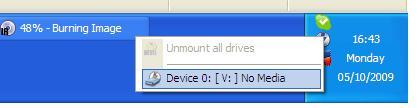
Ok, you are almost done.   On your Windows task bar (bottom right hand corner near clock) click the silver icon with mount v drive2the lightning flash. From here you can select the ISO file and VLC or whatever your main choice of media player should choose to play the film straight away.  From this icon you can chose to dismount the disc or insert another one.   Windows will think its just a normal CD, it all works totally transparently.  You can even make this pretend DVD drive sharable if you wish over your network.   I have done this with some awkward applications that might not install easily over a network, gives me the advantage I can remote in (using Remote Desktop or VNC viewer) to my own PC to pick and choose the right ISO file.

This is also great if you want to go away somewhere with your laptop and not bring bulky films with you.  Ought to save battery power by not using a real DVD drive too.

It should be noted that ISO files get very big (DVDs are ~4.7Gb) so make sure you have enough hard disk space.   mount v driveRecent netbook computers like Dell’s Mini 10 which might have a small SSD hard disks of 16Gb or so should definitely bear this in mind.

Enjoy watching movies whilst in bed/whilst camping/on a plane!

Put Hebrew support on Windows XP

(and Arabic and Persian and any other right-to-left language)

Have been doing this in my current job and also when I was at the UK branch of NICE Systems, an Israel based VOIP telecoms recording software company, mainly as one of the proprietary web based databases had to have the Hebrew support to operate.

These tips will come in handy if you want to set up a computer to Hebrew speaking staff or for someone learning languages at home.

To start with you will need your XP CD handy as Windows will need to fetch some files off it, if you have a computer like a Sony Viao/E machines/Packard Bell etc PC which don’t provide you with CDs to restore your operating system you will need to check your C: drive for a folder called i386.

Go to Control panel and Region and Language Options.   Tick the box that says “install files for complex script and right-to-left languages (including Thai)”

Click Apply and ok.   Windows will now ask you for your Windows CD, if you don’t have it, choose a path where your i386 folder is, ie: C:\i386.   Once done, you can go back to the “languages” tab and click Details and then choose Hebrew.

You can test now this by going to www.google.co.il

If you live in Israel don’t forget to set your time zone to Jerusalem GMT+2 hours.   To do this double click the clock in the bottom right hand corner and then click on time zones.

Don’t forget if you are or your users have two or more languages and you don’t want to use the little blue square language control icon on the taskbar, you can use Alt + Caps lock to switch keyboard layouts.  Some of my users need Russian as well as about 10-15% of Israelis originate from the ex-Soviet Union countries.

If you need a Hebrew keyboard, take a look on ebay, you can get sticker sets very cheap to give you the necessary symbols to type in Hebrew.