Electric cars in Israel

Yesterday I watched a DVD I bought ages ago about the failure of General Motors EV1, an electric car available to be leased to the public in California.   Against the wishes of the satisfied owners of the vehicles who rented them and really liked the cars, not just at the attractively low cost of ownership but the comfort, handling and style as well as zero emissions and better ethics of the EV1 and protested against having their cars taken away, as the leasing program ended, and the vehicles were taken away and destroyed.   The film concludes a combination of the state of California, General Motors itself or the oil companies were to blame, as electrics cars require too much investment for their design and for infrastructure set up to fuel them, as well as lack of some kind of business model for the government to receive tax from owners to maintain the roads.

But could electric cars be a reality in some of other part of the world?

A short while ago, some of the Israeli and mainstream world news were looking on a project Renault and Nissan were working on called Project Better Place who are based in California like the GM EV1 and similar electric vehicles made by Ford, Toyota and Honda which also quietly pulled the plug on them leaving just Toyota with their unexpectedly fashionable Prius hybrid model.  Better Place wants to sell purely clean running electric cars to test their vehicles elsewhere, in Denmark, Israel and Hawaii more specifically.  This is expected to happen in 2011.

Where as the start of the 201xs is still not out of a recession, there must be people happy to pay for a more expensive car with low cost of ownership as well as getting a feel good feeling from the obvious environmental benefits.   The worrying large scale of recalls this week Toyota have announced with many models of their cars unexpectedly accelerating probably means that all car makers R&D labs might have to subject more stricter testing to new model vehicles.

I am having to sell my trusty old Peugeot 306 diesel as I am not using it being in between doing charity work in Israel, but this little car was enormously popular, the second best selling car in the UK during the 90s, and as about half of them were diesels, Peugeot were something of a pioneer of diesel cars making them affordable with around 55 miles per gallon economy, decent performance and handling, people bought them who probably wouldnt of consider a diesel before.  Therefore its inevitable someone will make a mass market electric car, as the attraction of leaving behind a legacy of over-taxed and dirty petrol to history is a dream I think most of us would like to realise.

If you think about it, Israel doesn’t have oil so has to get it from neighbouring Arab countries who are not always easy to live with, does not have an actual motor manufacturing plant or any conflict of interest from the government.   As Israel is a small country, the typically short range of a battery isn’t too much of an issue here.  Given the amount of talented engineers in Israel I would say that this kind of project has the best possible chance of success I think.   I think this is quite exciting and really hope this comes to fruition.

But wait, the Palestinians are also wanting an electric car, this man in Gaza converted his old Peugeot 205 to electric 🙂  Youtube link.

laptop repair – Replacing a broken screen bezel on Fujitsu-Siemens Esprimo V5535

This week in my workshop, well my parents living room actually, is this Fujitsu Siemens laptop which looks rather battered, two of the keys are missing, Vista is dog slow with 1gb of RAM (the video card uses 256Mb of this)

Software wise, this computer had an antivirus client called System mechanic but I couldn’t test it for spyware as it would blue screen, seems like System Mechanic would cause AVG or Malwarebytes to crash horribly.   I decided to get rid of System mechanic, and AVG once installed showed the computer has two conventional viruses, Malwarebytes picked up over 26 threats though.  Once this was cleaned up I put on Service Packs 1 & 2 for Vista, to lock the machine down against future security issues.

An extra 1gb of memory was ordered and fitted, easily slots inside the trap door underneath the machine, a new keyboard is coming from a company in China, this will take a few weeks to get here though.

For now I noticed the screen bezel, the plastic frame surrounding the LCD panel has broken as it appears to have been dropped at some point.

Here I am going to show you how to remove and replace the screen bezel.

This is quite simple, remove the rubber pads which cover the screws as shown, these are just gently prised out with a small flat bladed screwdriver.  Next remove the philips screws, there are four in the top and two at the bottom, sometimes there are screws in the side that might need to be removed (like a Dell Latitude I once did)   Note the right hand side part of the bezel was cracked so badly, it came off in my hand.

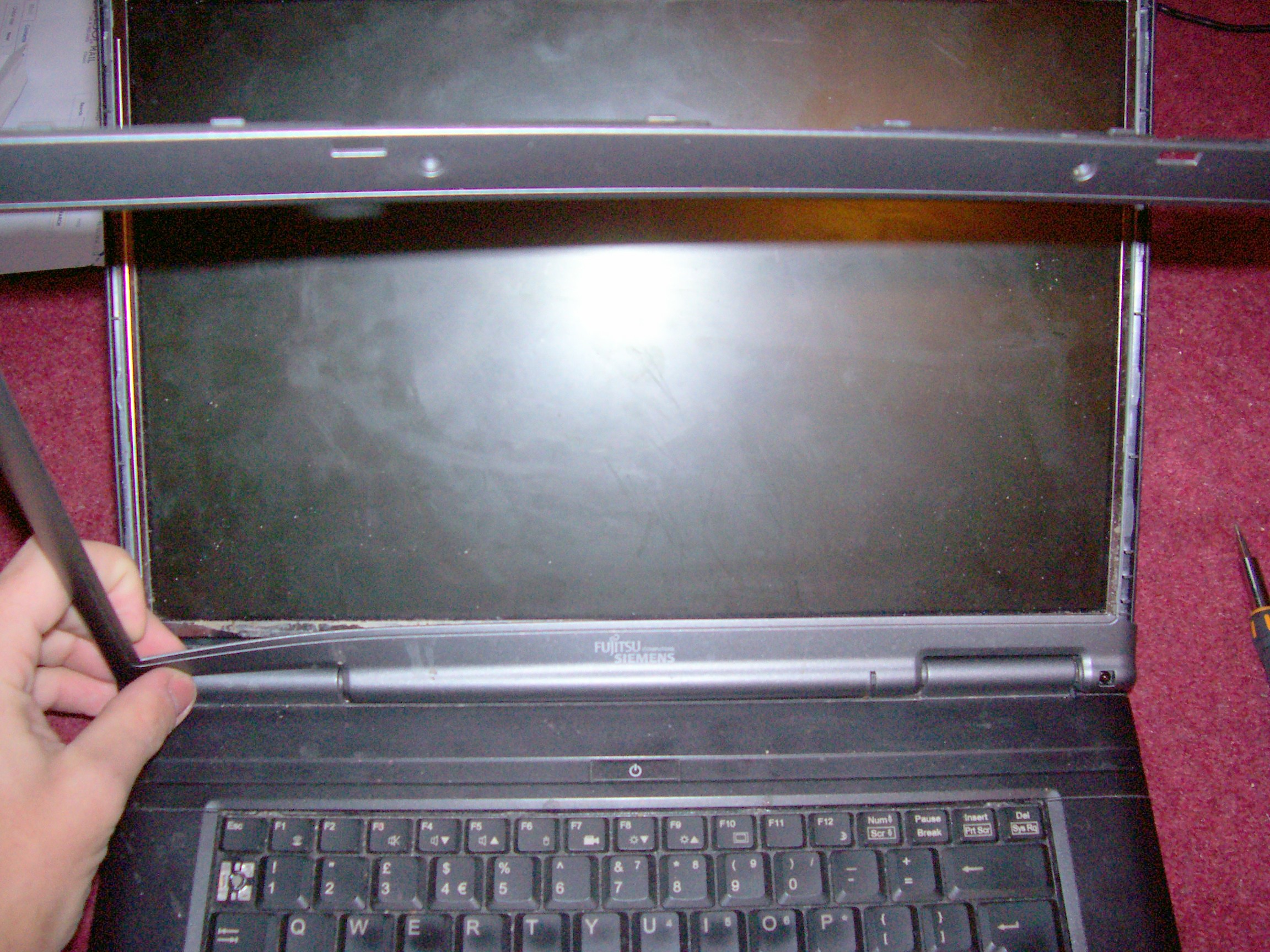
DONT use a screw driver to prise off the broken panel.  You run the risk of scratching or damaging the LCD or the inverter (the long circuit board at the bottom which provides voltage to the LCD backlight)  use sharp fingernails or some wooden or plastic implement, for me this was easy as the bezel was already broken, but if its not coming out, I would use one of those wooden stirring sticks you get from coffee shops and cut and file the edge into a sharp point to prise it off, I would start by easing the top off, on this particular laptop the bottom piece needs to be bent slightly to get the two corners out of the screen hinges.

This can discarded now and we are ready to fit the replacement bezel.

This is very simple, bend the bottom gently to get it to fit inside the two hinges, the rest just snaps into place, double check all the edges feel flush, you may need to slide the screen latch to get the hooks aligned with the gaps in the new screen bezel.  You can now re-fit the screws and the rubber pads.   Removing the LCD panel is quite easy, its is very fragile, so it would need to be gently removed by holding the edges of it only and the flat cable on the back of the LCD and the wires for the screen backlight can be disconnected.

Here is the laptop done with the broken bezel next to it.   The cost of the new bezel?   £5 including shipping!   The company I bought it from on ebay appeared to have too much stock of this part I think!

Jonathan is not working at the moment, but welcomes any offers to do laptop or PC repair work in return for a donation towards his second trip to Jerusalem to carry on doing IT support and administration for Bridges for Peace.   This is purely a voluntary position and not waged so would appreciate any kind of rewards for IT consulting or donations of course.  He is hoping to fly again possibly early March.

three flights for 2010…

I am looking to return back to Jerusalem to volunteer a bit longer.   I am seeking means to get sponsorship as I am expected to raise funds for airfare, health insurance, rent, bills and food.

In May, I wish to go to a close friend’s wedding in Spain, also my sister has a baby (ETA is 21st May) this time, I am planning to stay this time till the summer, so a rough idea of a schedule is as follows:-

Fly Luton to Tel Aviv (approx £200 return) – February
……
Fly Tel Aviv to Luton – 3rd week of May
Go home, see sister, husband and new baby
Fly Stansted to Asturias (Spain) – 4th week of May
Fly Asturias back to Stansted – 3 days after above
Stay somewhere in Luton or Stansted, one night, then;
Fly from Luton back to Tel Aviv
………
Fly Tel Aviv to Luton – some point in summer?

All flights are to be done with Easyjet, the budget airline.   Flights from UK>IL are expected to be around £200 lowest end of February’s prices, to include all taxes/baggage allowance.

So I am needing at least £500 for just three flights and all the messing about in between.  I am not working at the moment whilst in the UK, and its not possible to get anything due to my recent broken elbow.

Also with my recent injury I need to get a good deal with travel insurance that doesn’t mind dealing with customers with an ongoing health issue.  Not sure how this normally works.

I am prayerfully looking to raise funds for the first part of my second chapter in my volunteering, would be grateful of any suggestion of ideas or opportunities.

back in the UK in deep winter…

back at home in our green white and (sort of) pleasant land.

being home is strange.   My home city of Portsmouth seems a bit foreign with the extreme cold and 4 inches of snow on everything here.   I decided to venture out to Commercial Road, in the centre of town and bought a few things.  On the way home I managed to fall over on the pavement, each time more painful.    There is a shortage of grit so the pavements are incredibly slippery.

I spend some time catching up with friends and plan what my next challenge is.   I have no job at the moment, so I spent today putting together a small server in my parents house to learn some new IT skills.

Replacing a DVD drive on a laptop, as part of refurbishing a Compaq Presario 2100

I have been fixed and serviced numerous laptops whilst volunteering for a charity here in Israel.

Here I am going to show you how to replace a DVD drive on a laptop that has this unit ‘fixed’ By that I mean on business laptops like IBM’s Thinkpad series, most Dell Latitudes & some Inspirons, Compaq Evos the drive can be removed and replaced with a simple lever that unlocks the drive so it can be slid out without any tools, and without even turning off the computer, you can unmount the drive on the Windows task bar. On these laptops that have the drives fixed often on Toshibas and Sony Vaios, these can be replaced be requires the computer to be dismantled more fully, if that sounds scary, actually this can be done often without a problem if you go slowly and take care.

One was a Lenovo 3000 that belonged to a friend which upon finding that the main board was defective was not economical to fix. One of the usable parts that I salvaged was the DVD writer. The hard disk was also faulty so the LCD screen and the keyboard will be listed on ebay at some point.

To remove and replace the DVD writer on a Lenovo 3000 v100 you simply turn the whole unit over and underneath is one screw that can be removed, inside this is a metal bar which can be poked sideways enabling the DVD writer to be slid outwards, without opening the actual body of the laptop. (Sorry no pictures)

On this Compaq Presario 2100 its a little more involved. This laptop is much different from other Compaqs I have seen as the layout of the insides is quite different. It has an AMD Athlon 2800 processor, doesn’t have a built in wireless card so uses a slot in PC card one (signal strength is poor as it doesn’t have a proper antennae) and the battery has not surprisingly aged and will only run for 30 minutes. However after a reinstall of Windows and regular drivers and fresh version of the owner’s apps it runs very well, its not hugely quick as it has 512Mb of memory.

First of all these two computers actually have standard type laptop DVD drives. You can get this style part from a specialist mail order computer dealer or look around for a new or used one off ebay.

What can make things difficult is the plastic fascia panel of the drive may be a different colour or a totally different shape from the standard, often these panels can be changed over they can be gently prised off and swapped over, as long as its exactly the same make (often LG, Samsung, NEC, Sony etc) and model drive. This can save you money as long you make sure you choose exactly the right drive.

First of all, work somewhere with enough space and near something earthed like a radiator to earth yourself from any static that can damage electronic products. Make sure the computer is turned off and the AC adapter is disconnected and the battery is removed. I would suggest you tape the screws onto a piece of paper with a diagram of where they go in, you don’t want to lose them or put big ones in where only little screws go in as this can cause damage. Get a decent small screwdriver set, I went though several sets of the cheap ones, they were total rubbish the handles would break off or the tips were just get mashed up and were not suitable for getting out little tiny screws. I got a good set from the motor retailer Halfords for about £7.99 about two years ago.

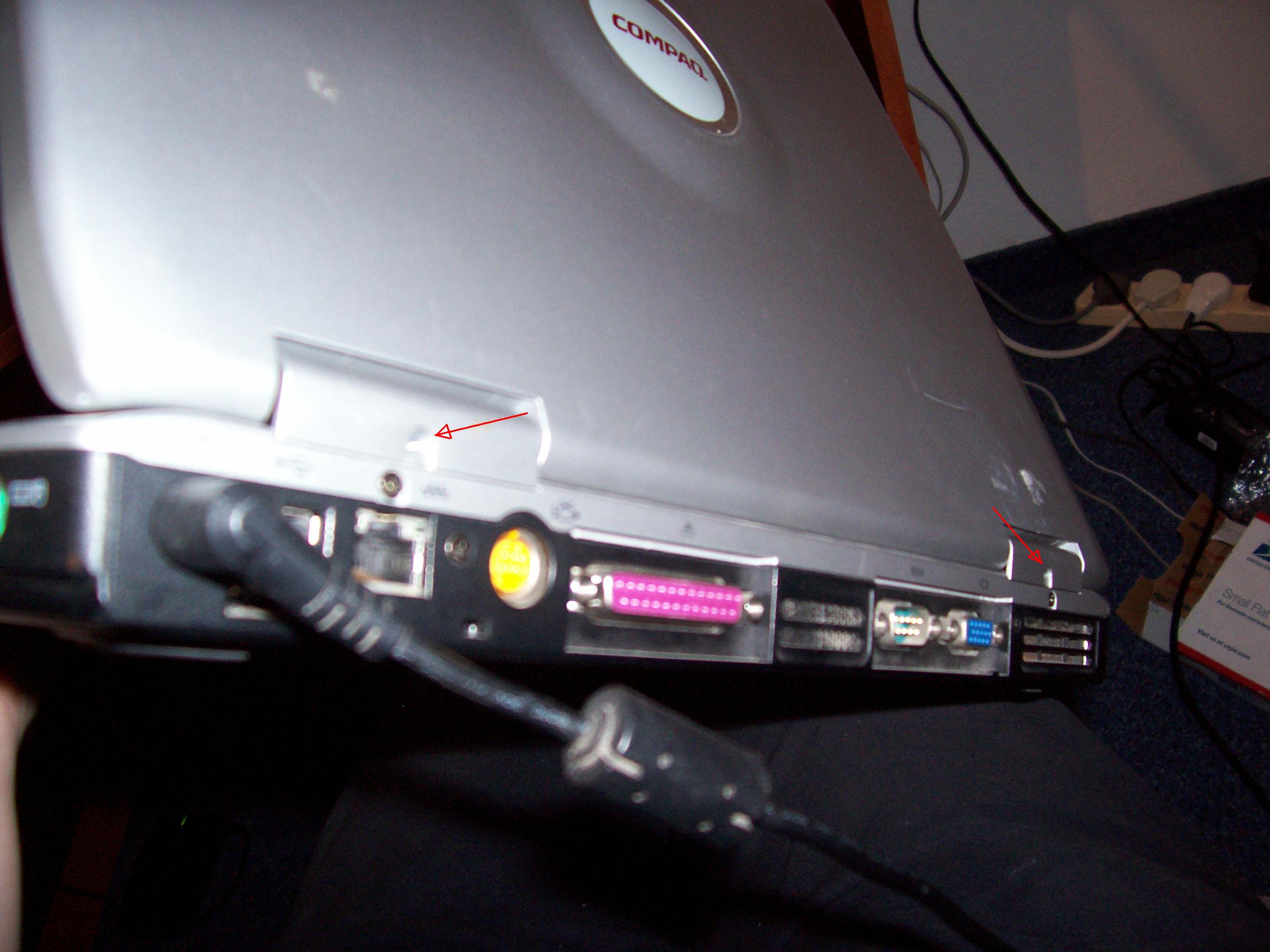
Turn your Compaq Presario upside down and remove the screws at the back that hold the silver panel which is above the keyboard, sorry I missed out making a picture for this step.

There are two more screws behind the computer where the panel covers the screen hinges go, don’t forget these.

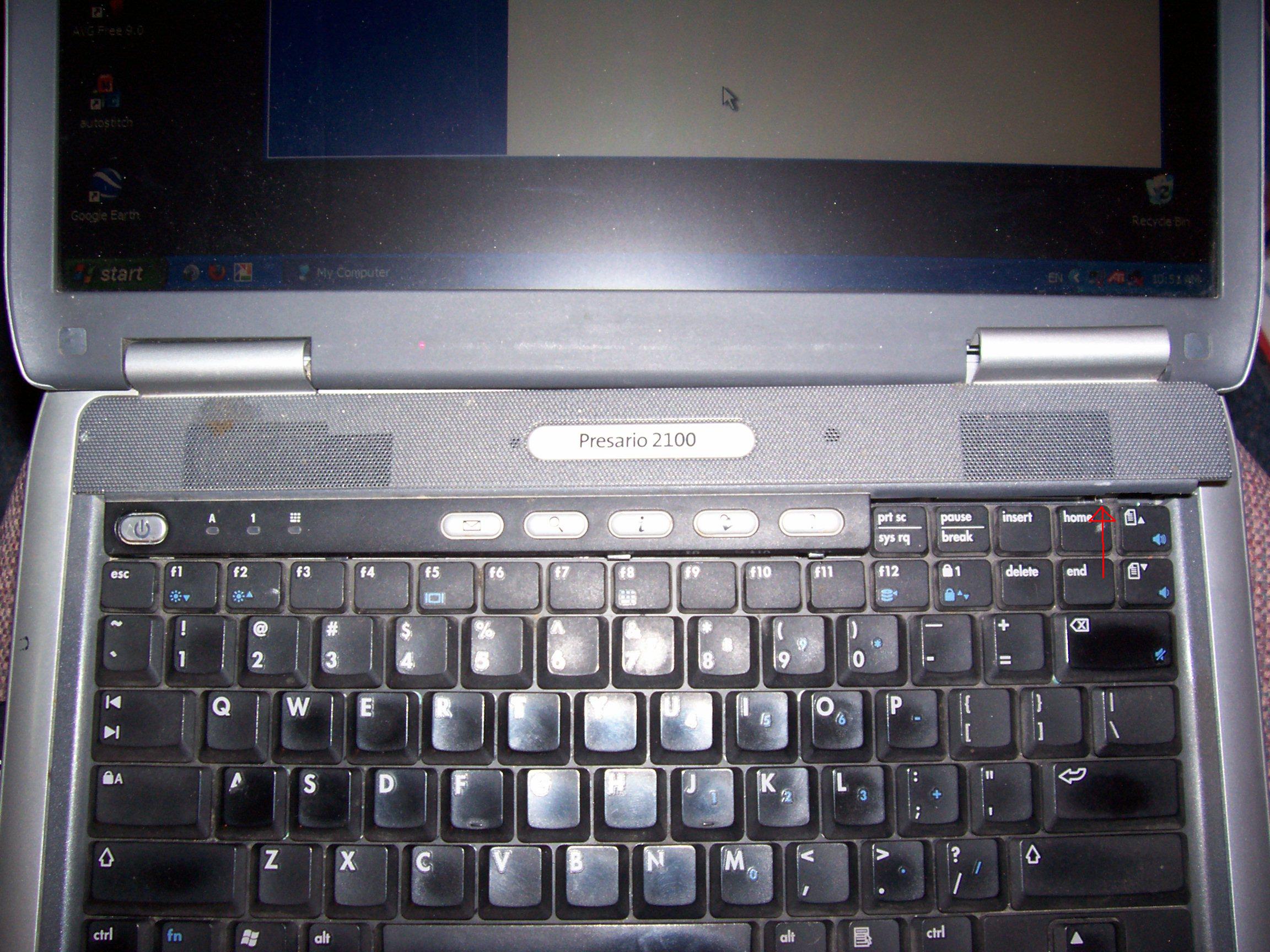
Tilt the scree fully back and this panel can be removed easily. On a Dell Latitude or Inspiron, this panel can removed easily without taking out any screws it just prises out. Actually the little silver power button was a bit wonky as it was a bit broken previously, (not by me taking the machine apart!) so I glued it gently back in place, and now its all fine.

You need a largish thin bladed screwdriver to start easing off the panel on the far right in between the top row of keys by the break and scroll lock keys and prise it upwards, work your way leftwards, and eventually this panel should come free.

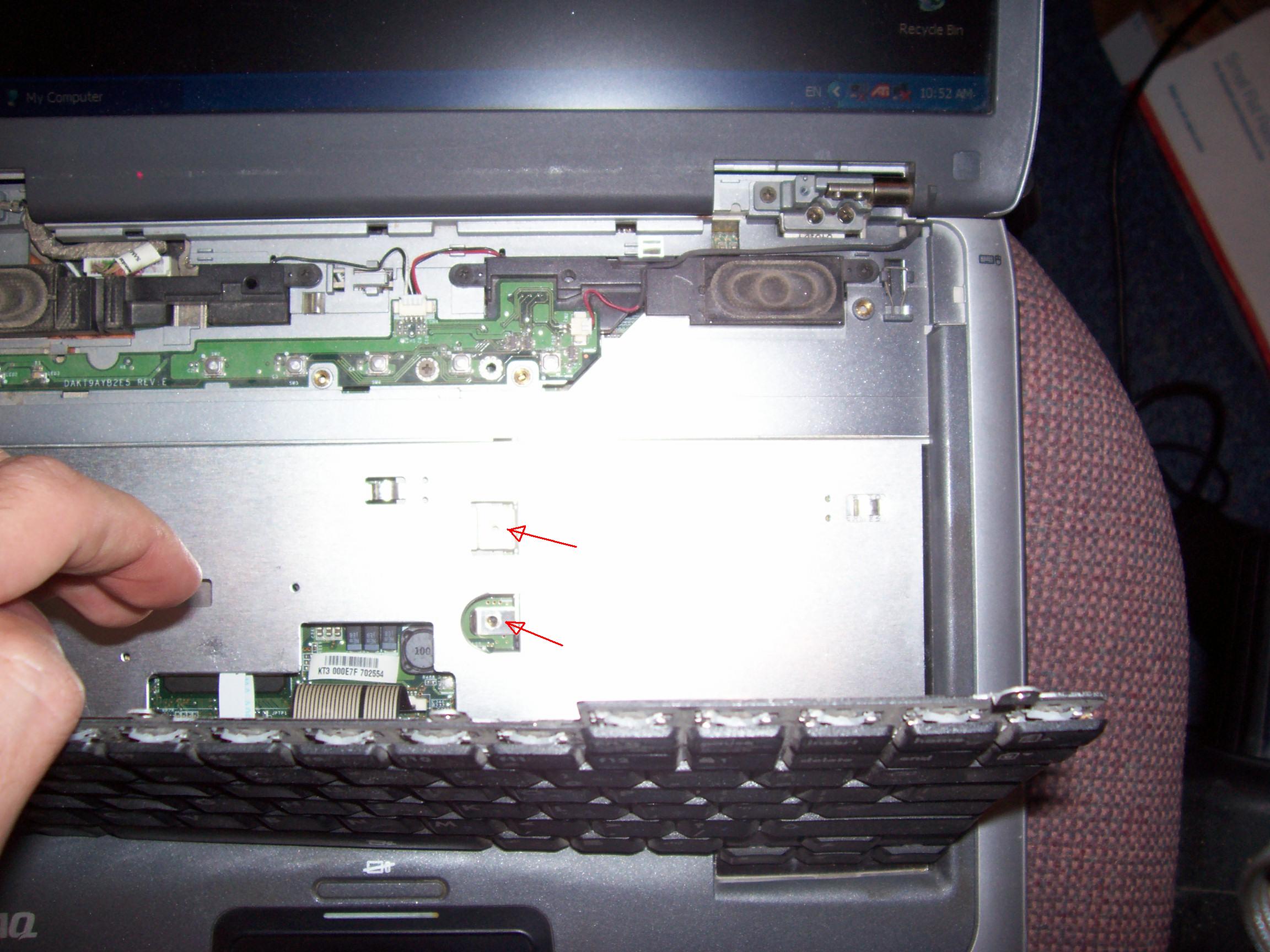
Next there are four screws holding the keyboard down, remove all of these, note, the right hand one is a different size from the other three.

Inside in the middle is two screws, these different sized ones can be removed.

The drive can now be removed, slide it out.

Reassemble is the reverse of disassemble 🙂

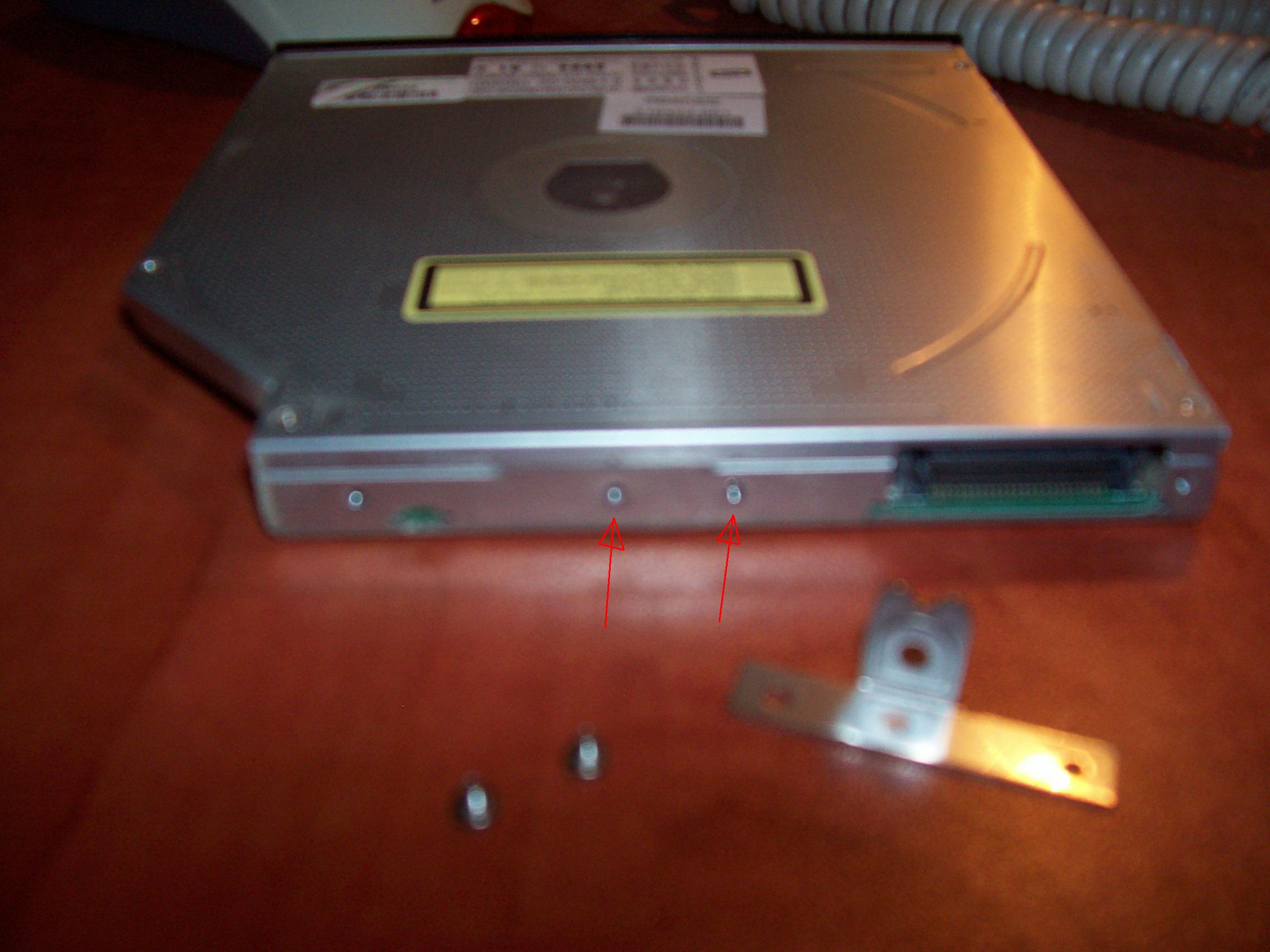
Here is the drive from the Lenovo unit, you can see this little bracket will need to be removed, the original broken (which was a ‘combo’ unit read only DVD, read and writes CDs) drive from the Compaq has different metal bracket from the one from the Lenovo. There are two screws that you can remove to take off this little bracket and swap it over to the replacement drive.

The replacement drive be fitted back in its place. As I mentioned, the plastic front panels can be a different shape, some could be curved or sloped which can be awkward to find a replacement, this drive is slightly wrong, the front panel of the replacement drive sticks out by about 1-1.5mm, but it works perfect and should not be a problem.

Jonathan has spent the last five years keeping professionals in vehicle contract hire, healthcare, software development and Christian ministry keep working on the move. As he seeks to look at carrying on donating his time in looking after the IT backbone of a charity in Jerusalem, he is seeking means to get new sponsorship, therefore if you have a question for him on laptop maintenance/repair, even to initially check if its viable feel to comment below. He would appreciate some kind of gift towards his next challenges coming up in 2010.

By Jonathan Posted in it, me

I need online browser favourites/bookmarks feature for Firefox

My personal laptop I took with me to Israel was set up a few months ago to dual boot into Windows XP and Windows 7 (RC1 release)  so could test drive Microsoft’s newest OS.   Also I set up my work PC to do the same thing just for training purposes.

Often I get home and I find some web site I find interesting I find I saved on my browser favourites which was at work, and now I cant find it.  The same when using Windows 7 and not being able to find the site saved on the browser of XP.

I use Firefox and have done since the first release 5 years ago, and am gradually getting people at work to completely phase out Internet Explorer and provide them with training to learn any differences in using it.  Normally they take to it pretty quickly.

One thing I really could do with and that is the means to keep my browser favourites on line, so I could just get at a particular site no matter where I am.  I think the Opera browser has this feature (tried Opera once but didnt really like it)

At work, my users might often have to sit at another desk, either to cover for another member of staff, or if their PC develops a fault and needs to be fixed or replaced.   Likewise we also have Macs for publishing, audio and video development work, and Windows PCs for regular administration as its cheap and more familiar to many users.   Now, without getting into a debate of what’s better, Firefox is perfect choice for me as the Windows and Macs versions are similar and consistent in use and some of the extensions are usable on both systems.   I just need a way to get at my favourites from any darn type of computer anywhere.

Multiple sets of browser favourites that could be used with a log on and password, for an individual member of staff or for a department would be good.

Its not as if browser favourites should be a big file, so bandwidth is not going to be an issue here.

The RSS feed feature is nice for reading news but don’t think its that widely used for anything else.

I think there are dedicated Firefox extensions for live bookmarks but they are not widely used by any of my fellow IT professionals I know.

Does this sound like a much needed new feature that a lot of other people, be it regular administration staff or IT professionals should have.   Of course this could be used on handheld devices with web access as well.

Please do comment.

Jon’s thoughts on P2P file sharing and the media

There’s been a lot of debate as of lately about file sharing and people downloading pirated material.

Peter Mandelson’s announcement on cracking down on file sharers this week has raised some groups raising opposition in the media, including things on Facebook. I thought I would write some thoughts here.

Firstly it was the Pirate Bay, a Swedish organisation who set up a search engine to find bit torrents (sections of files stored on individuals computers being shared around the world) that were in the news over their arrest.

Some years ago, there used to be a web site called Audio Galaxy, this came shortly after Napster. I got lured into getting free music on the advise off a friend. It was quite simple, it was just a plain web site and if you couldn’t find the artist or song you were looking for, ie: that artist’s record label had set it to be blocked you just deliberately spelt it wrong and you normally find what you were looking for. After a year of court cases or so, the judges decided Audio Galaxy couldn’t protect the rights of the musicians and it was shut down for good.

After this I decided not to download music any more, why? Because as a Christian I felt that it was stealing, it wasnt until a year I deleted all the music I had that I didn’t have on a CD or got from iTunes. Instead when using iTunes I could pay for songs but more often than not I would just go on their to go “window shopping” for music, ie: I could listen to 30 seconds or so of a song, but rather than buy it I preferred to stick to CDs, as sometimes a really great artist can have a album of consistently good songs and its nice to have all of them, and another coloured bit of plastic to stick on a book shelf. Yes my preferred way to get music I like is get second hand CDs of ebay. Why, as someone else probably has what I am looking for paid the full price and got tired of it, so as long as its in good condition, second hand is good for me, especially as probably most of the 50 or so CDs I have bought in the last few years were less than £3.

Also, if you created something for a living, a piece of music, starred in a movie or wrote software, its your bread and butter, you don’t want someone else taking your work for free. If you were doing pencil drawings on the sea front, you wouldn’t be very happy and someone suddenly coming up with a camera and taking pictures of your work, then finding out a copy of that drawing was in a friend’s house above their fireplace as the bought it cheaper from other part of town? I have worked for two software companies, I am not a programmer but I do provide a service of support and providing the tools (good maintained PCs, laptops, etc) to the men and women that write those software applications. If that company’s products ended up on bit torrent I could have no job and can’t pay my bills.

When the Pirate Bay got shut down earlier this year, there were massive rallies of people supporting those folks as the three men all got prison sentences. There’s even political groups called the Pirate party that specifically want to let people carry on downloading whatever they like without threat of legal action. Ok I admit record labels do not always work with good ethics, and the fact that Sony music put malware on music CDs to put stealth software on peoples computers without them knowing really should be illegal and someone ought to be fired and put in prison over that.

Let me get this straight, did the three Swedish guys set up Pirate bay for free as volunteers? Were they the Scandinavian Robin Hoods of the digital age don’t you think they made a bit of money from banner advertising and sponsors, actually quite a bit of money??? But a political party that is based against copyright? Huh? I thought the main priorities political organisations should rally around is improve our health services, schools, police and fire services, get maximum value for money for our taxes, reduce crime, unemployment and poverty, and help the environment not try to keep people fill up the computer hard disks with as much dishonestly obtained media as they can??? This doesn’t make any sense.

Hard disks are getting ridiculously cheap with 1 Terabyte of disk storage available for less than $100 or so, but internet providers are finding even with so called ‘unlimited download’ packages, they don’t have the bandwidth to sustain people 24×7 helping themselves to an inexhaustible supply of entertainment, and may have to sending threatening letters with the hint of cutting people off.

In this digital age, we all want things here and now, its exciting I find that I can hear a song on the radio of something I grew up with but never knew the name of the band, a quick google search of the lyrics and there it is, then listen to it on iTunes, then get it and pay for it there and then. This quick purchase to scheme ought to grow onto more mobile devices now. Getting more abilities to get music on the fly without some maddeningly complex DRM scheme you have to jump hoops through is a must.

I am quite a big fan of mainly 1980s-reformed for quite a few years lately-but now defunkt British band New Order, with their most recent album they offered a free MP3 download of a song which had 30 seconds of 5 different tracks of their album melded together, which was enough to convince me that that albums was worth buying. And it was! More of this kind of marketing please record labels. Also make all those nice rare stuff and B sides that impossible to find available buy or obtain as a bonus please!!!

I am big music fan and since passing 30 few year back my musical diet as grown more and more widely, collecting all the missing albums of the artists I like, songs from TV commercials, music from movies (getting quite into John Williams and Ennio Moricconi especially) stuff I group up with and new talent that might not so far have got recognition deserved.

The basic thing I am saying is here, if you live music, movies, games and applications, please pay or them, and keep the people employed in those industries in jobs. You can’t moan that music isn’t like the good old days if you just rip it off of Bit Torrent. Some organisations have sprung to provide better more direct ways for artists to get paid for their work, I have bought two CDs from Cdbaby.com who are good example of this.

Using applications like Limewire or Bit Torrent not only is illegal and hurts jobs, it also is a BIG security risk for your computer, as spyware is usually bundled with Limewire, and you could easily accidentally configure both apps to make some other the folders on your computer shareable to the outside world, possibly compromise a business’s IT security to hackers, or mean (probably not likely) you could be prosecuted. I spend a lot of time removing spyware and malicious apps which convention antivirus software cant always touch and needs specialist tools to remove, even then with modern techniques like root kits, criminals are more determined to find ways to get your computer to deliver spam or find financial information without you knowing. Software on torrents is often poisoned with nasty side effects. Mac users are non immune, the new Mac OS X 10.6 ‘Snow Leopard’ has been discovered interfered with malware.

When I get back to the UK I want to be able to know that my possible future employers isn’t in danger of having their products being ripped off.

If you cant afford to pay for software, especially things like Microsoft Office or Adobe’s graphics applications, there’s always free open source alternatives which might need a bit of retraining but much of the free software these days is becoming extremely high quality. If anyone feels that Bit Torrent etc does have a legitimate uses for things feel free to comment below.

 

Office Live – A review

Since someone told me about this at work, it sounded interesting.   Microsoft now offer a free template style web site which they host at no charge, a domain name is even thrown in.

When I needed to get an online presence to promote my plans to volunteer in Israel this seemed like a great solution.

Microsoft being the all conquering software mammoth are of course criticised, and using this service wasn’t going to win me respect with my fellow geek peers but I decided to go for it, seeing as free as good, and HTML and web design isn’t my thing and starting learning in this field isn’t on my priority list seeing as there’s other aspects in IT that more relevant to my interests.

During the registration process I was required to be a fee of GBP12 (this computer doesn’t have a pound sign 🙂 )  for my domain name, ok its not too much money although I would preferred them to be upfront about this though.

Once I started editing the site, there are some premade templates (about XYZ company, contact us, various similar things) that enable to drop pictures into the suggested layouts which is quite nice.  The editing suite uses Microsoft Office 2007 ribbon style interface which works quite well here, the editing functions do seem logical and pleasant to use.

Then I found out the not so good factors.  I was using a mixture of Microsoft Office 2003 and Open Office Writer 3 to write the text in different style and colour text and copy and paste it into the site.  Because of this I think some information got corrupted cause certain pages to hang.   A typical instance of this would be that when bring up the office live site to edit it, I would just get a permanently spinning please wait symbol.   The way to get round this would be to simply delete the specific page and make a new one with the already save text in hand.   On the main page which would be the default.html site though, it was impossible to delete or edit this.

The really bad point came when I showed a church leader about my plans to go away and the web site came up mostly blank on his Vista based PC running IE7.  This was quite embarrassing, although my fault I should of checked it under several browsers in advance.   It seemed using it on different browsers and different screen resolutions would give a very different view, the neatly tiled collection of photos on my home 20” monitor would become an odd mess on a smaller display.

On the forums of Office Live there’s quite a few other people with this issues, the documentation and a response back from a support agent told me about checking for cookies and other browser settings, (which I had already done.)

Unfortunately these issues remain consistent if I change any aspect of the site on my home or work computers using different browsers or versions of Windows.

I would recommend that businesses do not use this free application it is too unreliable and not standards compliant (like a lot of Microsoft’s other products) making it not easily manageable.

I am finding since updating this blog, I really like WordPress, I can have a web site in a blog format with easily changeable themes and layouts and where as the dashboard interface takes some getting used to and some menu features are not always where you expect to find them, its perfect for any individual or business for casual writings or any kind web site that revolves round a updateable blog.

If you are curious, you can check out the Office live web site maker here www.officelive.com

read this site in English/French/German/Spanish/Russian/Arabic/Hebrew

You can read my blog in several languages including English

Vous pouvez lire mon blog en plusieurs langues dont le Français

Sie können mein Blog lesen in mehreren Sprachen, darunter Deutsch

Usted puede leer mi blog en varios idiomas incluyendo el Español

Вы можете читать мой блог в том числе несколько Языки Испанский

يمكنك قراءة بلوق بلدي في عدة لغات منها الاسبانية

אתה יכול לקרוא בבלוג שלי במספר שפות כולל ספרדית

Play CDs/DVDs on a netbook or laptop without optical drive

For this you will need to download the following free software:

Infrarecorder (if you don’t already have CD burning software) –  http://infrarecorder.org/

Daemon Tools lite – http://www.disk-tools.com/download/daemon

VLC Player (if you don’t already have DVD playback software) – http://www.videolan.org/vlc/

make iso

Firstly make an ISO image file of the CD or DVD in question.   I use Infrarecorder for this.   If your DVD is copy protected I am not going to tell you how to get round this or break the law, I am using one of my organisation’s promotional DVDs for this purpose.

I am using a nice Dell Latitude X1 laptop, its oldish machine but small light and has an external DVD burner.   I did this as I was setting the computer to play a looped DVD film for a conference.   There is not much space in the booth at the conference on the table to set up the external DVD drive.

make iso2

I like Infrarecorder as its simple and free & open source.  I don’t care much for Nero as it make images into its own .NRG format rather than more common .ISO file.   Nero comes bundled with all kinds of extra bloated stuff most people don’t want.

Transfer the ISO file onto your laptop via network or USB drive.

I would suggest you copy your ISO file on the the root of C:\ drive of your laptop or make a folder lets say, C:\films or whatever.  This was they can be read by different people if you have multiple log in profiles on the computer.

Install Daemon Tools on the laptop.  When you do this, don’t go through the installation too quickly.   The makers of this application bundled some annoying form of search toolbar, which could be a mild spyware app.  Just make sure you untick this before doing the installation.   Once installed it will need to install some drivers to make it mimic a standard CD or DVD drive.  You will need to reboot.make iso3

Once rebooted your PC will show and extra optical drive in My Computer,  I would recommend that you not leave it mapped to D: or E: or whatever as it could get confusing, if you later plug in an external DVD drive.   So, go into Start, Settings, Control Panel, Administrative Tools, Computer Management, on the left hand side click Disk Management.   Here you can rename the drive letter of the pseudo-optical drive.   I have chosen V:for virtual DVD.

Install VLC player if you haven’t already done so.   VLC or Video LAN Player is way better than Windows Media Player, Real Player and Quicktime, and it plays DVDs.   Note it isn’t perfect (although I have been at presentations and see the three above application crash or refuse to play video properly)    Sometimes VLC may start playing the main part of the movie rather than the main film menu.   Having said that, I love VLC’s vast choice of format support, simple non-gimmicky interface and fast start up time, which other mentioned apps do very poorly.   Without hidden extra bundled software VLC is my choice for corporate use and at home.

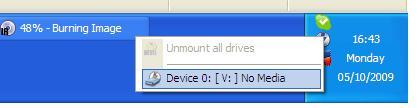
Ok, you are almost done.   On your Windows task bar (bottom right hand corner near clock) click the silver icon with mount v drive2the lightning flash. From here you can select the ISO file and VLC or whatever your main choice of media player should choose to play the film straight away.  From this icon you can chose to dismount the disc or insert another one.   Windows will think its just a normal CD, it all works totally transparently.  You can even make this pretend DVD drive sharable if you wish over your network.   I have done this with some awkward applications that might not install easily over a network, gives me the advantage I can remote in (using Remote Desktop or VNC viewer) to my own PC to pick and choose the right ISO file.

This is also great if you want to go away somewhere with your laptop and not bring bulky films with you.  Ought to save battery power by not using a real DVD drive too.

It should be noted that ISO files get very big (DVDs are ~4.7Gb) so make sure you have enough hard disk space.   mount v driveRecent netbook computers like Dell’s Mini 10 which might have a small SSD hard disks of 16Gb or so should definitely bear this in mind.

Enjoy watching movies whilst in bed/whilst camping/on a plane!